

How to Use AI for Sales Prospecting: A 7-Step B2B Workflow


- Start AI sales prospecting with a defined ICP, exclusion rules, and reliable account and contact data, not with AI-written outreach.
- Use AI for research, classification, scoring support, signal summaries, and first drafts. Keep factual data verified and high-value judgment human.
- Route prospects by fit, timing, engagement, and role instead of pushing every record into one sequence.
- Write scores, signals, actions, and outcomes back to the CRM so the workflow can be measured and improved.
Many B2B sales teams already use AI somewhere in prospecting: account summaries, first-line drafts, an AI column inside an enrichment table. Each saves a few minutes. Used separately, they do not automatically produce a better prospecting process.
The usual failure is not the model. It is disconnected AI tools sitting on top of weak data. When the ICP is vague, records are stale, and nobody can explain why one account outranks another, AI produces faster versions of the same problems: confident research on the wrong accounts, personalization built on unverified facts, and results that never reach the CRM.
This guide treats AI as one layer inside a prospecting system, not as the system itself. It walks through a 7-step workflow from ICP to CRM feedback and shows what enters each step, what AI does, what stays verified or human, and what happens next. The value comes from deciding what data AI receives, what decisions it can support, and what happens after it produces an answer.
What is AI sales prospecting?
AI sales prospecting is the use of AI to help identify, prioritize, research, and engage potential buyers. It combines CRM records, account and contact data, and buying signals with workflow automation. AI speeds up research, classification, and drafting, while human judgment stays in charge of strategy, verification, and the decision to reach out.
HubSpot's AI sales prospecting guide frames it the same way.
Two boundaries keep the topic clear. First, prospecting is not the same as lead generation. Prospecting is the outbound work of choosing accounts and people and starting relevant conversations. Lead generation is broader and covers inbound capture, content, chatbots, and forms, which the guide to AI lead generation covers. For the fundamentals of the discipline, see the overview of B2B sales prospecting.
Second, a language model is not a contact database. It should not be the source of an email address, phone number, or revenue figure. Those facts come from traceable data providers and verification.
The useful output is not "more emails." It is a prioritized, explainable set of accounts and people, each with a documented reason to reach out and a clear next action.
Where AI fits in the prospecting workflow
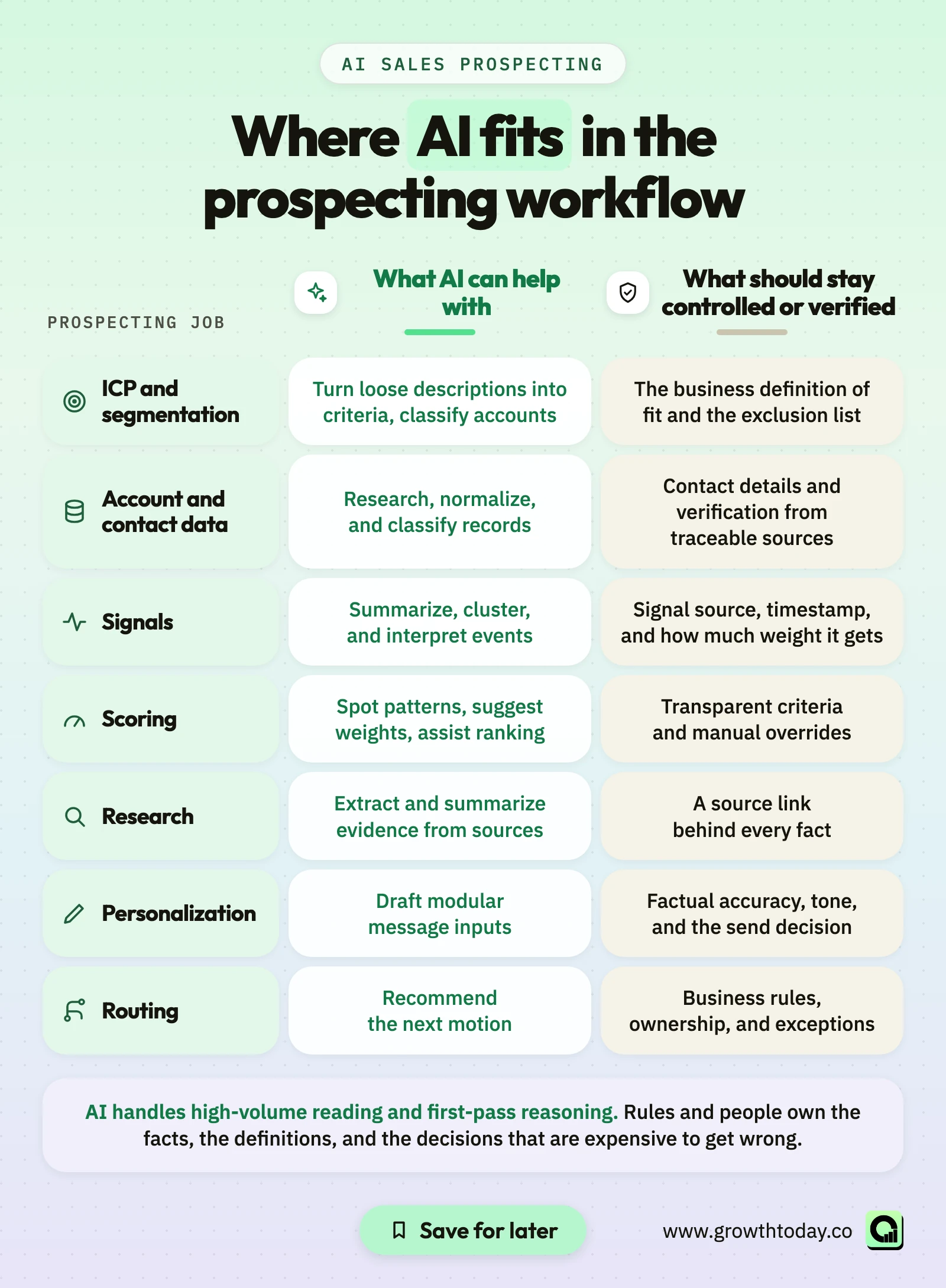
AI is good at reading, sorting, summarizing, and drafting. It is weak as the final authority on facts and business rules. The table maps each prospecting job to what AI can support and what should stay controlled or verified.
| Prospecting job | What AI can help with | What should stay controlled or verified |
|---|---|---|
| ICP and segmentation | Turn loose descriptions into criteria, classify accounts | The business definition of fit and the exclusion list |
| Account and contact data | Research, normalize, and classify records | Contact details and verification from traceable sources |
| Signals | Summarize, cluster, and interpret events | Signal source, timestamp, and how much weight it gets |
| Scoring | Spot patterns, suggest weights, assist ranking | Transparent criteria and manual overrides |
| Research | Extract and summarize evidence from sources | A source link behind every fact |
| Personalization | Draft modular message inputs | Factual accuracy, tone, and the send decision |
| Routing | Recommend the next motion | Business rules, ownership, and exceptions |
AI handles high-volume reading and first-pass reasoning. Rules and people own the facts, the definitions, and the decisions that are expensive to get wrong.
How to use AI for sales prospecting in 7 steps
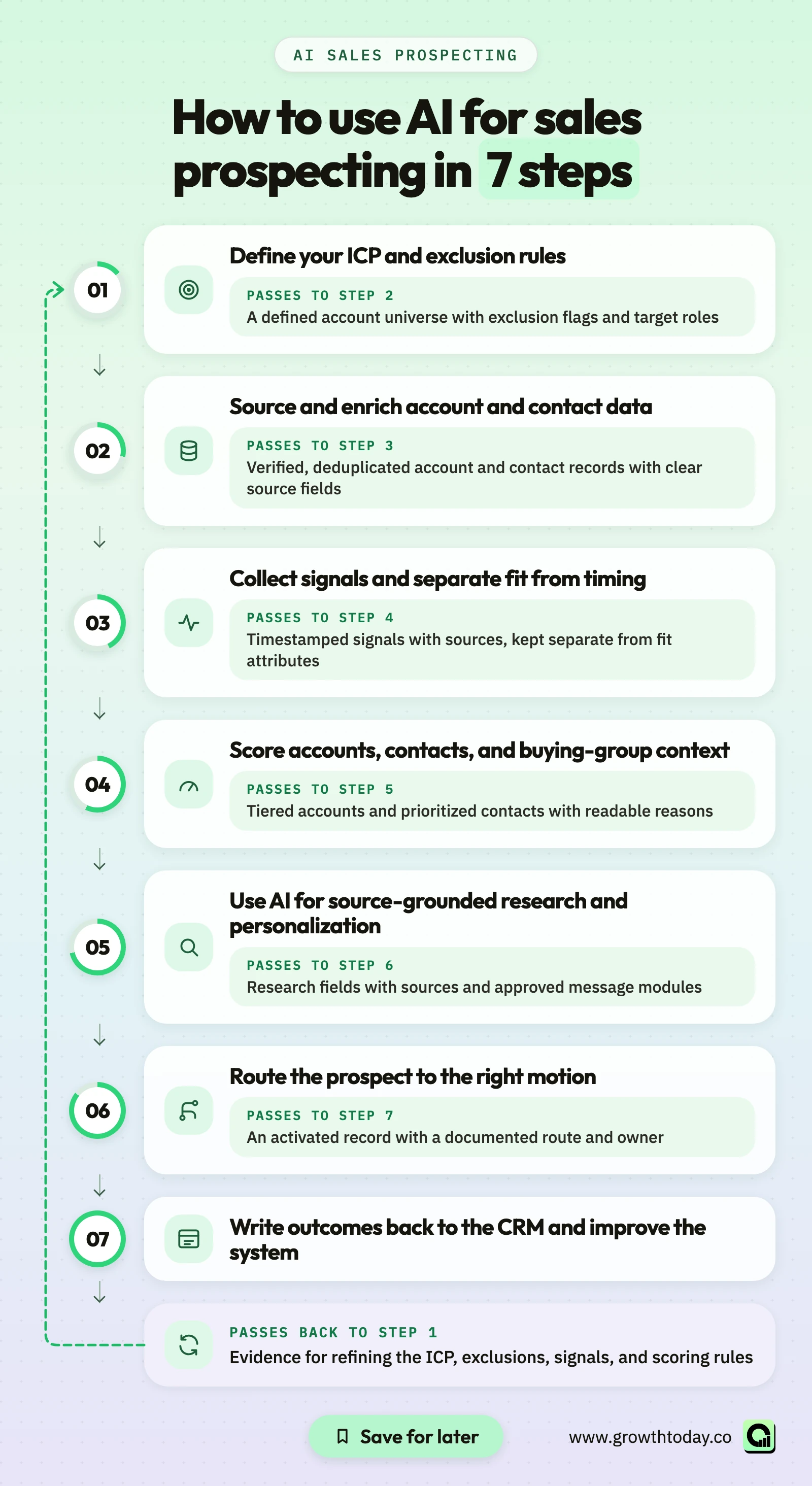
The workflow runs in one direction: ICP and exclusions → reliable data → signals → scoring → research and personalization → routing → CRM feedback. Each step produces what the next one depends on, so starting with AI-written emails means every later step inherits the gaps.
1. Define your ICP and exclusion rules before you automate
Prospecting starts with the account, not the contact. Before AI touches a list, the ideal customer profile needs to exist as testable criteria a system can apply consistently.
Useful ICP attributes are measurable: industry, business model, employee or revenue band, geography, CRM or tech stack, and the presence of the roles your offer serves. Then define what keeps an account out: current customers, open opportunities, partners, competitors, and do-not-contact lists. Write these as suppression rules now, not after outreach has started.
Name the buying group too: which roles decide, which influence, and which use the product day to day.
AI helps in two ways. It can translate a loose description such as "mid-market SaaS with a growing sales team" into concrete fields and filters. It can classify messy accounts, for instance reading a homepage to decide whether a company sells to businesses or consumers. It should not invent the ICP, which is a commercial decision owned by sales and revenue leadership.
An example ICP, for illustration only: North American B2B SaaS companies in a defined revenue band, with HubSpot or Salesforce in place and a sales leader or RevOps role on staff, excluding current customers and accounts with an open opportunity.
If the list itself is the bottleneck, the guide on how to build a usable B2B prospect list covers list construction in detail.
2. Source and enrich account and contact data
Start with the CRM: account history, past conversations, owners, and closed-lost reasons. Pull that context first so a known account is not treated as a stranger.
Fill the gaps from external sources. Contact details and firmographic facts should come from data providers, ideally a multi-provider approach where one source fills what another misses, followed by email and phone verification. This is the factual layer, and it needs to be traceable.
AI belongs in the interpretive layer. It can summarize what a business sells from its website, map a title such as "Head of Revenue Systems" to a function and seniority, tag an industry when provider data is inconsistent, or flag likely duplicates.
The line to hold: a language model can generate an email address that looks plausible and does not exist. Never let AI fill a contact field without a provider source and verification behind it.
Freshness matters as much as coverage. People change jobs, so set a refresh cadence and deduplicate before anything is written back to the CRM. For a hands-on enrichment example, see this Clay prospecting workflow.
Growth Today example (inbound enrichment): For Everworker, Growth Today's enrichment work cleared an 18,120-contact backlog in about two weeks, enriched new inbound contacts within 24 hours, and saved more than 5 hours per SDR per week. This was an inbound enrichment workflow, not a cold outbound campaign.
3. Collect signals and separate fit from timing
Fit tells you who to target. Signals help you decide when, and with what context.
Signals come from several places:
- First-party: website visits, content engagement, replies, and activity on your own LinkedIn content.
- Partner or marketplace: review site activity or interactions observed through a shared ecosystem, where available.
- Third-party and event-based: job changes, new hires in relevant roles, funding announcements, and changes in tech stack.
Third-party signals can be useful and quick to activate. First-party context compounds over time and is harder to copy. A practical system can combine both.
A signal is not the same as buying intent. A funding announcement or a new VP of Sales is a reason to look closer, not proof that a company is in a buying window. Signals vary in strength, and many contain noise. Treat each one as evidence with a source, a date, and a weight, not as a verdict.
Keep fit and timing as separate fields. A hiring spike at a poor-fit account does not make it a good account, and a strong-fit account with no recent signal is still worth tracking. Blend them too early and the team can no longer see why a record moved.
AI helps by reading job posts, summarizing announcements, grouping related events, and flagging which signals look relevant. The source and timestamp stay attached to every interpretation. For a deeper breakdown of signal categories, read the guide to B2B buyer intent data.
4. Score accounts, contacts, and buying-group context
Scoring turns everything collected so far into a priority order. Many setups produce one number and hide the reasons behind it. A more useful approach keeps the components visible:
- Account fit: how closely the account matches the ICP.
- Timing: the strength and recency of signals.
- Engagement: how the account and its people have interacted with you.
- Role and decision authority: whether the contact can decide, influence, or only use.
- Data confidence: how complete and verified the record is.
Keep the component scores, or at least a short reason field, next to the total, so a rep can see in the CRM why an account sits at the top. Group accounts into tiers so routing has clear inputs.
AI can find patterns in past wins and losses or suggest which attributes seem to predict progress. People approve the criteria, weights, and overrides. No universal threshold works for every company, so calibrate scores against your own outcomes and revisit them as results come in.
Growth Today example (account tiering): For Stord, Growth Today qualified and tiered over 160,000 US accounts into Tier 1 through Tier 3, reduced campaign launch time from days to hours, and set contacts to refresh monthly. The result came from building qualification, tiering, and refresh logic into the operating process.
5. Use AI for source-grounded research and personalization
AI research works far better at this point, once the system knows which accounts matter, who to contact, and what signals exist.
Define the research questions in advance. What does the company sell and to whom? What changed in the last 90 days? Which initiative might connect to the problem your offer solves? Ask AI to answer each in a structured field, with a source URL and date behind every fact. Structured fields are easier to check, reuse, and write back than free-form paragraphs.
For personalization, build message inputs, not whole emails from nothing. A simple chain keeps the logic honest:
For illustration: a careers page lists several open SDR roles (observed fact, with URL and date). That may mean the outbound team is growing (why it matters). The team may be spending a lot of rep time on manual research (hypothesis). The rep chooses whether that angle fits and how to phrase it (approved angle).
Set clear rules for the model. No source, no claim. Do not state assumptions about the prospect as facts. Do not reference personal details that would feel intrusive. Review every message to a high-value account before it goes out, and spot-check the rest. HubSpot's guide makes the same point: AI-generated emails should be reviewed and refined for accuracy and relevance.
The broader craft is covered in the guide to personalized B2B outreach.
6. Route the prospect to the right motion, not just an email sequence
A qualified record does not automatically mean "send a cold email now." Routing decides which motion fits the account's tier, signals, engagement, and ownership.
Common motions include direct outreach from an SDR, high-touch work owned by an AE, nurture for accounts that fit but are not active, scaled automated sequences for lower tiers, and content or paid audiences for broad coverage. Many accounts warrant multi-channel prospecting rather than email alone.
One illustrative routing pattern, not a universal rule:
- High fit and strong engagement: direct or high-touch outreach.
- High fit and low engagement: warm nurture while signals are monitored.
- Lower priority: scaled nurture or a paid audience.
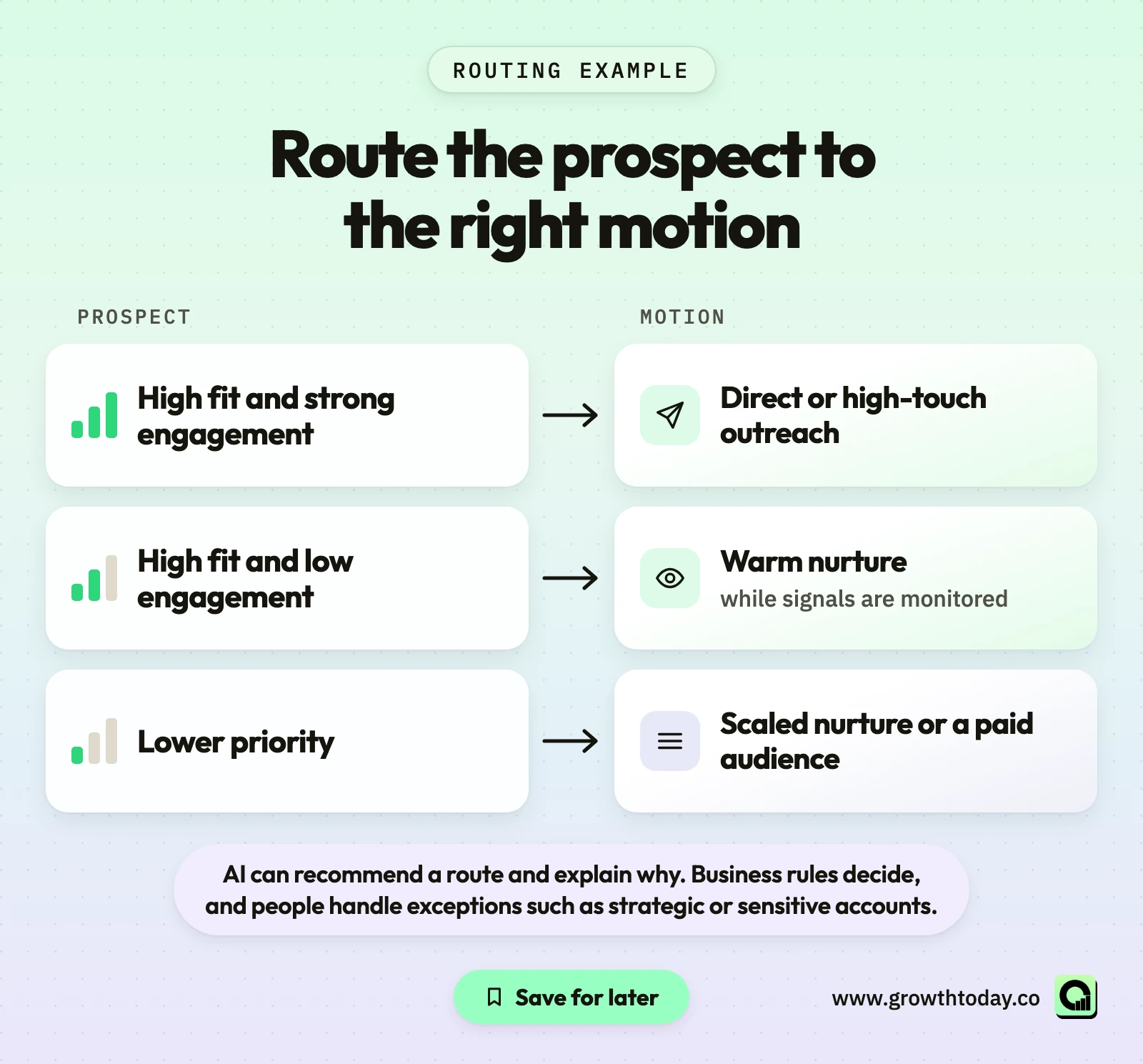
Before any record is activated, run it through gates. Is it suppressed or excluded? Is the account owned by an AE who should decide? Was it contacted recently? Is there sending capacity on healthy domains? These checks are rules, not AI judgments, and they run every time. AI can recommend a route and explain why. Business rules decide, and people handle exceptions such as strategic or sensitive accounts.
This is the same order Growth Today uses in its managed GTM Engineering system: scored and routed records move into activation such as sequencing, event-triggered outreach, lower-tier automation, or ABM coordination.
7. Write outcomes back to the CRM and improve the system
AI prospecting becomes an operating system only when the next run learns from what actually happened.
Write back the research fields and their sources, signal types and timestamps, component scores and tier, the routing decision and owner, replies and their sentiment, qualification status, meetings and opportunities, and suppression or opt-out status. Without these fields, nobody can tell which signals, tiers, or routes produced qualified conversations.
Then review on a regular cadence. Compare qualified replies, meetings, and opportunities by tier, signal, and route. Accounts that scored high and went nowhere often reveal a weak ICP attribute or an overweighted signal. AI can surface these patterns. People decide which rules change, and the reasons get recorded.
What should AI automate, and what should stay human?
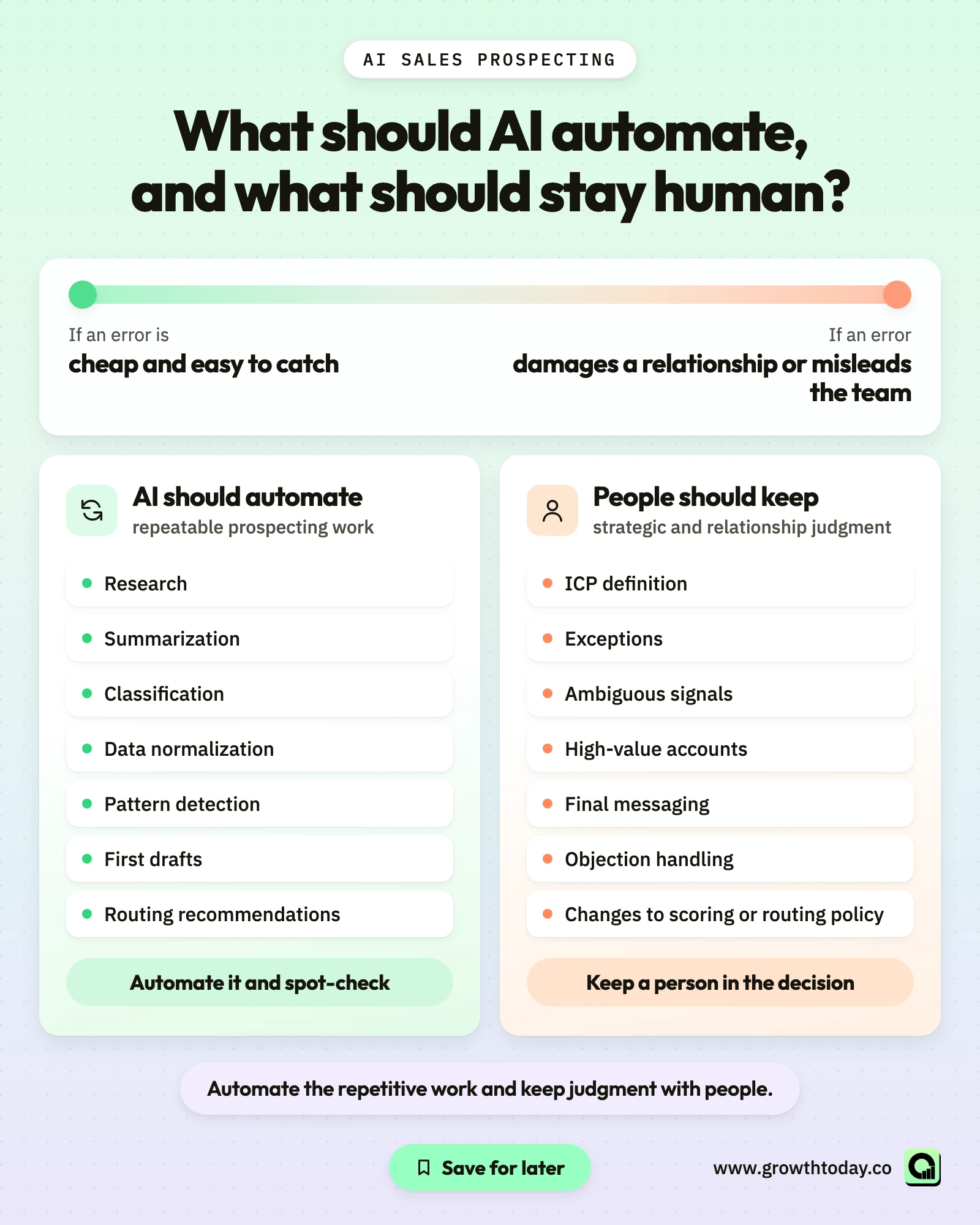
AI should automate repeatable prospecting work: research, summarization, classification, data normalization, pattern detection, first drafts, and routing recommendations. People should keep strategic and relationship judgment: ICP definition, exceptions, ambiguous signals, high-value accounts, final messaging, objection handling, and changes to scoring or routing policy.
Growth Today's working principle follows the same line: automate the repetitive work and keep judgment with people. Full autonomy is not the goal. Unsupervised systems drift, and the drift shows up first in a prospect's inbox.
AI earns its place on tasks with high volume, clear inputs, and checkable outputs, such as tagging business model across hundreds of company websites or drafting research summaries a rep can scan quickly.
The practical test is the cost of a mistake. If an error is cheap and easy to catch, automate it and spot-check. If an error damages a relationship or misleads the team, keep a person in the decision.
What tools do you need for AI sales prospecting?
No single product is required. What you need is coverage of each job in the workflow, with clean handoffs between them. The table maps each job to a tool category and examples Growth Today works with. It is not a ranking.
| Job | Tool category | Example tools | Passes to the next step |
|---|---|---|---|
| TAM and sourcing | Prospecting databases and sourcing | Clay, Apollo, Sales Navigator | Target accounts and contacts |
| Enrichment and verification | Data providers and enrichment waterfalls | Clay plus specialist providers | Verified contact and firmographic fields |
| Signals | First-party and external signal sources | Website, social, hiring, funding, and stack data | Timestamped events with sources |
| AI research | Language model or agent layer | Claude or another approved model | Structured research fields |
| Orchestration | Workflow automation | n8n or an equivalent | Triggered steps between tools |
| Source of truth | CRM | HubSpot, Salesforce, Attio | Scores, routes, owners, outcomes |
| Activation | Sales engagement platform | Chosen by channel and workflow | Sequences, tasks, and replies |
CRM integration matters more than any single feature. Salesforce's AI prospecting guide and HubSpot both recommend tools that work with existing CRM data and workflows. Check current features and pricing on each vendor's own site before buying, since both change often.
For a broader view of options by category, browse the Growth Today AI GTM sales tools directory.
How to measure AI prospecting
Measure AI prospecting on two levels. Operational metrics show whether the system runs well: data coverage, freshness, enrichment success, tiering coverage, research time, and time from signal to action. Business metrics show whether it produces results: positive replies, qualified meetings, opportunities, pipeline, and cost per meeting. Strong operational numbers do not prove business impact on their own.
HubSpot's guide suggests a similar set, including response rate, meeting conversion rate, lead-to-opportunity conversion, pipeline velocity, and time saved per rep.
| Type | Metric | What it tells you | What it does not prove |
|---|---|---|---|
| Operational | Data coverage and freshness | How much of the target list is usable and current | That the records fit the ICP |
| Operational | Account tiering coverage | How much of the TAM is prioritized | That the tiers are correct |
| Operational | Research time per account | How much rep time AI saves | That the research is accurate |
| Operational | Time from signal to action | How quickly the system reacts | That the signal meant buying intent |
| Business | Positive reply rate | Whether messages resonate | That replies will become pipeline |
| Business | Qualified meeting rate | Whether targeting and routing work | Revenue impact |
| Business | Pipeline created or influenced | Commercial contribution over time | That AI alone produced it |
| Business | Cost per meeting or opportunity | Efficiency of the whole motion | Long-term account value |
The most useful view breaks business metrics down by tier, signal type, and route, which is where the CRM writeback from step 7 pays off. Activity volume, such as emails sent, can rise while qualified outcomes fall.
Common AI prospecting mistakes
Most failures trace back to a skipped workflow step:
- Automating before the ICP and exclusions exist. AI scales whatever definition it receives.
- Treating a language model as a contact database. Contact facts need providers and verification.
- Calling every signal buyer intent. One event is a reason to look, not proof.
- Blending fit and timing into one opaque score. Reps stop trusting a number they cannot explain.
- Letting AI write unsupported personalization. A wrong "fact" costs more than a generic line.
- Routing every record into the same sequence. Different tiers need different motions.
- Measuring volume instead of qualified outcomes. More emails sent is not progress on its own.
When several show up at once, the issue is usually system design, not the AI tool.
Compliance and data-use guardrails
AI does not change the rules for commercial email and direct marketing. It can raise the speed and volume of outreach.
In the US, the FTC's CAN-SPAM compliance guide states that the law makes no exception for business-to-business email. Commercial messages need accurate header information, non-deceptive subject lines, a valid physical postal address, and a working way to opt out that is honored.
Requirements outside the US differ. In the UK, the ICO's direct marketing guidance explains how organizations should plan lawful data use and respect objections to marketing.
Put compliance into system logic. Exclusions, opt-outs, and do-not-contact status should be fields every routing and activation step checks automatically. Confirm current requirements with authoritative regulatory sources for each market you contact.
This section is operational guidance, not legal advice.
When a prospecting workflow becomes a GTM Engineering problem
When the problem is no longer choosing an AI tool, but connecting data, enrichment, signals, scoring, routing, and CRM ownership into one workflow that keeps running, it has become a GTM Engineering problem. Common signs:
- data and signal tools return conflicting information about the same account;
- reps run their own AI workflows with different prompts and rules;
- scores exist, but they do not trigger consistent actions;
- research and outcomes are not written back to the CRM;
- marketing engagement and outbound prospecting run separately;
- workflows exist, but nobody owns their maintenance.
Growth Today's Managed GTM Engineering team builds and operates these systems inside the client's own CRM and stack. The work covers enrichment, signals and scoring, CRM routing, activation, and measurement, with AI-assisted research and personalization as one module. Launch timing depends on current data quality, CRM setup, and scope.
If your team already has the tools and needs the system around them,
Book Your Strategy CallFAQs
What is the difference between AI sales prospecting and AI lead generation?
AI sales prospecting focuses on choosing target accounts and people, prioritizing them, and starting relevant outbound conversations. AI lead generation is broader and includes inbound capture, content, forms, and chatbots. The two share data and signals, but prospecting is the more targeted, account-first motion.
What is the best way to start using AI for prospecting?
Start with one narrow, checkable task on top of a clear ICP, such as classifying accounts or summarizing research for Tier 1 accounts. Measure time saved and accuracy, then expand to the next step.
Can AI find accurate email addresses?
A language model on its own should not be trusted to produce email addresses, since it can generate addresses that look right and do not exist. Accurate contact data comes from data providers and verification.
Do I need an AI SDR tool?
Not necessarily. What a team needs is a workflow that connects reliable data, scoring, research, routing, and CRM writeback. An AI SDR product may cover several of those jobs, but it does not replace clear ICP rules, verified data, or human review. Judge any tool by how well it fits that workflow.
How do you measure AI prospecting ROI?
Compare the cost of tools and setup with changes in qualified meetings, opportunities, and pipeline, plus rep time saved. Record a baseline before launch so the comparison means something, and do not credit AI alone for results the whole system produced.
Ready to accelerate your pipeline?
Reach out to discuss how we can help your GTM team scale with automation and expertise.