



To improve email deliverability, first separate technical delivery from inbox placement. Then work through the system in order: provider requirements and authentication, sender reputation and infrastructure, recipient data, sending behavior, and placement testing. Test copy last. SPF, DKIM, and DMARC are the foundation, not a guarantee. Check placement with more than one signal, and once you run many domains and inboxes, treat deliverability as an ongoing operating system rather than a one-time setup.
When B2B outbound reply rates fall, the first reaction is usually to rewrite the email. That can cost weeks. If messages land in spam, or a sending domain has lost reputation, a sharper subject line will not reach anyone who never sees it.
This guide shows how to improve email deliverability for B2B outbound in a practical diagnostic order. It separates official mailbox-provider requirements from operating heuristics, explains what to check first when performance drops, and shows the point where deliverability stops being a DNS task and becomes ongoing GTM infrastructure work. It draws on current Google, Yahoo, and Microsoft sender guidance plus Growth Today's own infrastructure testing and monitoring workflow.
What email deliverability actually means
Three terms get used as if they meant the same thing. Email delivery means the receiving server accepted the message. Inbox placement means the message landed in the inbox rather than in spam or junk. Deliverability is the broader, ongoing ability to reach the inbox, shaped by authentication, reputation, recipient behavior, and infrastructure.
Most sending platforms report delivery. A "delivered" status means the message did not bounce. It says nothing about where it went after acceptance.
Reply rate is a useful alarm but a poor diagnosis. A drop can come from spam placement, bad data, a tired angle, or timing, and the number alone cannot tell you which. Open rate is weaker still. Open tracking depends on image loading, which mailbox providers and privacy features handle differently, so it is not a reliable stand-in for inbox placement.
| Metric or concept | What it means | What it does not prove | Best diagnostic source |
|---|---|---|---|
| Delivery rate | The receiving server accepted the message | That the message reached the inbox | Sending platform logs and bounce codes |
| Inbox placement | The message landed in the inbox, not spam or junk | That every provider and recipient saw the same result | Seed placement tests and mailbox-provider data |
| Deliverability | Ongoing ability to reach the inbox across providers | A fixed score that stays true after setup | Trends across placement tests, Postmaster Tools, complaints, and bounces |
| Reply rate | Share of recipients who answered | Whether a drop came from placement, data, or the message | Campaign data split by domain, inbox, and recipient provider |
| Open rate | A tracking pixel loaded | That a person read the email, or where it landed | Directional at best |
The practical takeaway: when a campaign underperforms, the first question is where the messages landed, not how the copy reads.
What should you fix first when deliverability drops?
Work from the foundation up. Confirm provider requirements and authentication first. Then audit domain, IP, and infrastructure reputation. Next check recipient data and bounce levels, followed by recent changes in volume or sending behavior. Use placement tests and provider diagnostics to confirm what you find, and test copy only after those layers are clean. This order reflects which layers block the others. It does not mean every problem starts at step one.
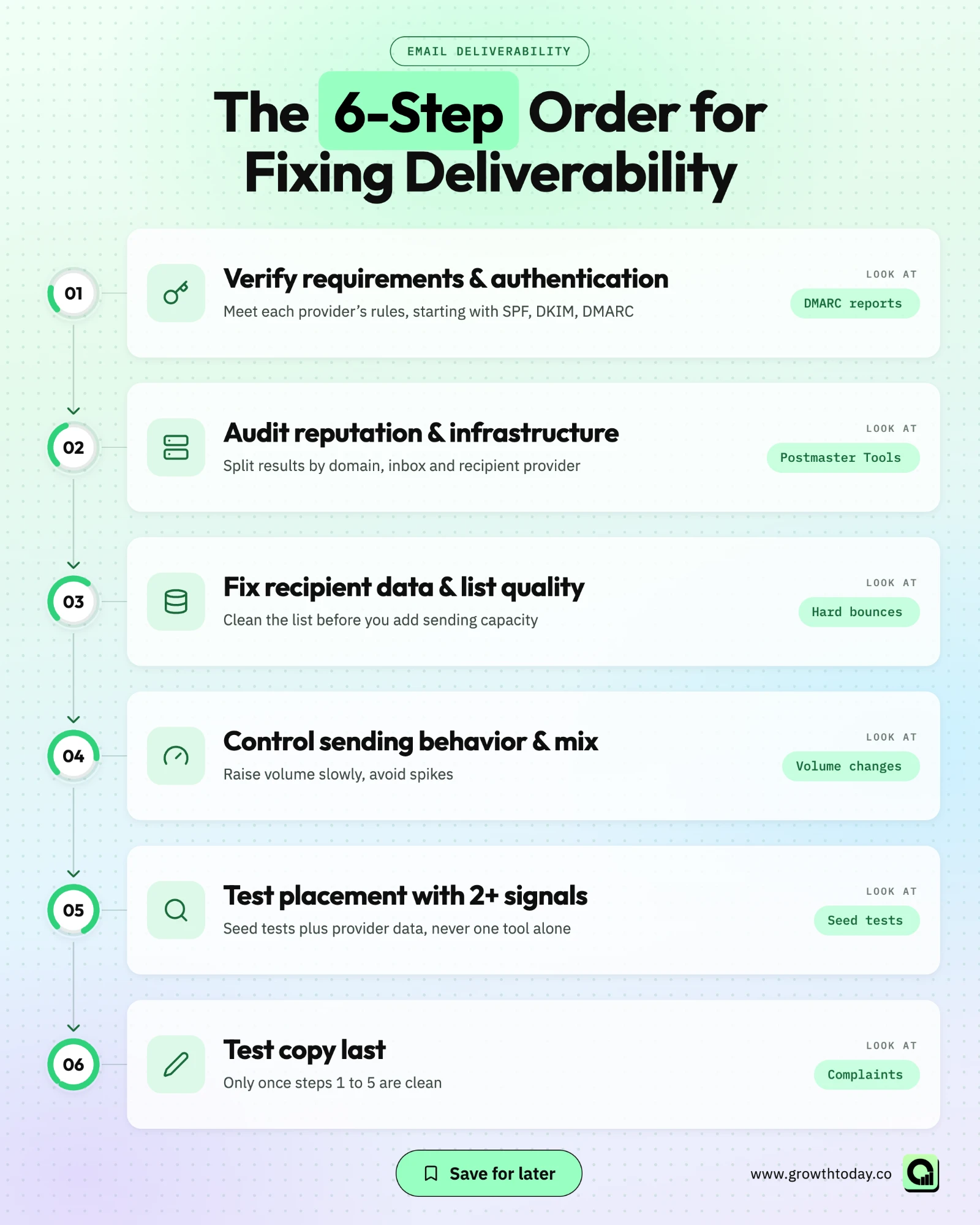
- Verify sender requirements and authentication.
- Audit sender reputation and infrastructure.
- Fix recipient data and list quality.
- Control sending behavior and recipient mix.
- Test inbox placement with more than one signal.
- Test copy and content after the infrastructure is stable.
Change one variable at a time while you work through the list. If a team swaps the sending provider, raises volume, and rewrites the sequence in the same week, nobody can tell which change helped or hurt.
Mailbox providers do not publish every filtering signal, so diagnosis is probabilistic. You are looking for the strongest evidence, not one guaranteed root cause.
Step 1. Verify sender requirements and authentication
What the major mailbox providers require
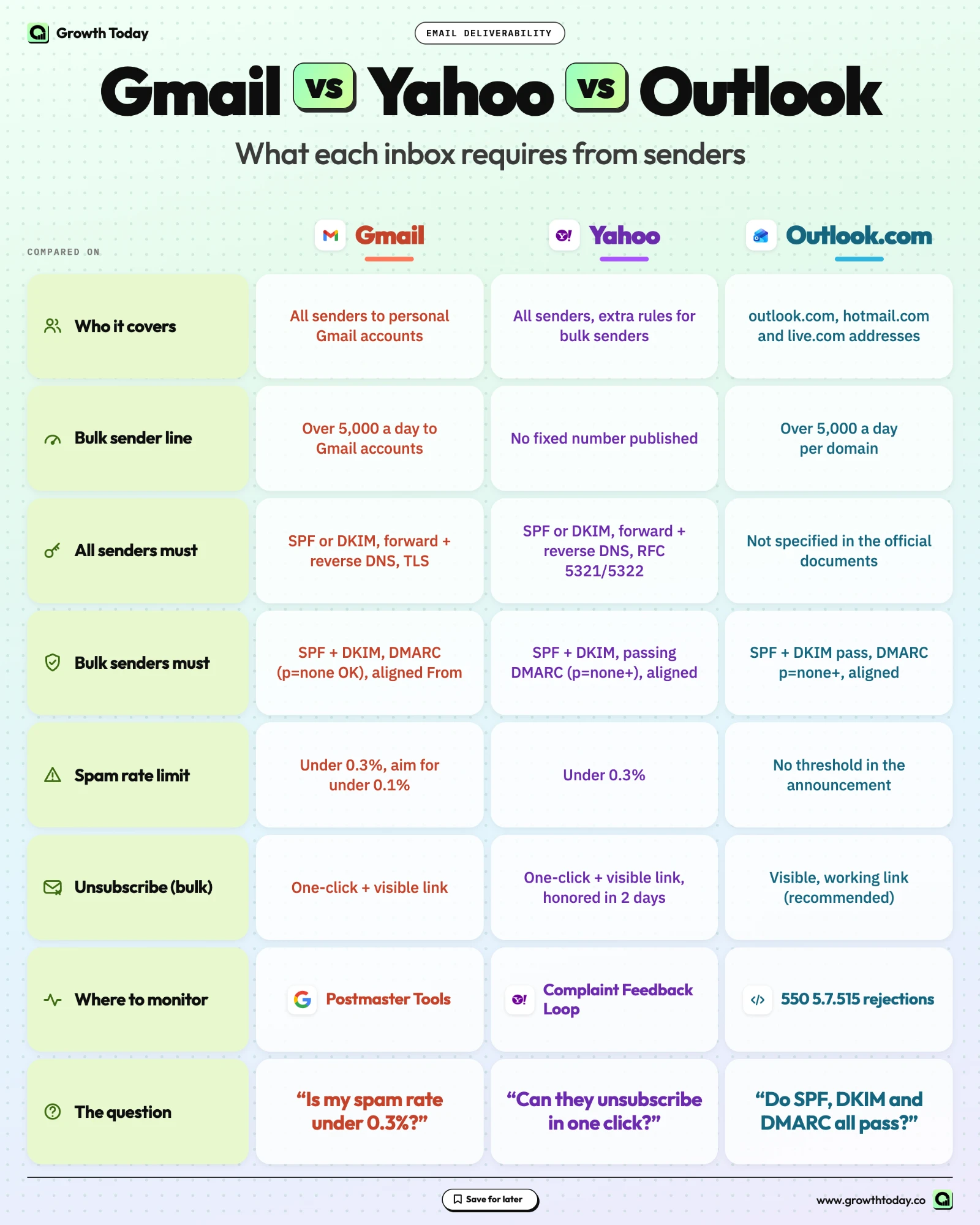
Google, Yahoo, and Microsoft each publish sender requirements, and they are not identical. Confirm that every sending domain meets the rules of the providers your recipients use.
The authentication building blocks overlap across providers. SPF lists the servers allowed to send for your domain. DKIM signs each message so the receiver can confirm it was not altered. DMARC tells receivers what to do when a message fails those checks, and it requires the visible From domain to align with the SPF or DKIM domain.
The infrastructure checks differ by provider. Google requires valid forward and reverse DNS (PTR records) for sending domains or IPs and a TLS connection. Yahoo requires valid forward and reverse DNS for sending IPs and compliance with the core email RFCs. The cited Microsoft requirement for high-volume Outlook.com senders focuses on SPF, DKIM, and DMARC.
This guide covers what DMARC does and why it matters, not the full DNS setup. The two tables below summarize current requirements from each provider's own documentation.
| Provider | Scope | Authentication |
|---|---|---|
| Gmail | All senders to personal Gmail accounts, with stricter rules for senders of more than 5,000 messages per day to Gmail | All senders: SPF or DKIM, valid forward and reverse DNS, TLS. Bulk senders: SPF and DKIM, DMARC (policy can be none), From domain aligned with SPF or DKIM |
| Yahoo | All senders, with extra rules for bulk senders. Yahoo does not publish a fixed bulk volume threshold | All senders: SPF or DKIM, valid forward and reverse DNS, RFC 5321 and 5322 compliance. Bulk senders: SPF and DKIM, a passing DMARC policy of at least p=none, alignment |
| Outlook.com | Consumer addresses on outlook.com, hotmail.com, and live.com, for domains sending more than 5,000 emails per day | SPF and DKIM must pass. DMARC of at least p=none, aligned with SPF or DKIM |
| Provider | Spam complaint guidance | Unsubscribe | Where to monitor |
|---|---|---|---|
| Gmail | Keep the Postmaster Tools spam rate below 0.3%. Google recommends staying below 0.1% and avoiding 0.3% or higher | Bulk senders: one-click unsubscribe and a visible unsubscribe link for marketing and subscribed messages | Google Postmaster Tools |
| Yahoo | Keep the spam rate below 0.3% | Bulk senders: one-click list-unsubscribe for marketing and subscribed messages, a visible link, and unsubscribes honored within 2 days | Yahoo Complaint Feedback Loop |
| Outlook.com | No complaint-rate threshold in the cited announcement | A functional, visible unsubscribe link is a listed recommendation | Bounce and rejection codes for failed authentication |
Sources: Google email sender guidelines, Yahoo Sender Best Practices, Yahoo Sender Hub FAQ, and Microsoft's announcement of Outlook requirements for high-volume senders.
Three scope details are easy to miss. Gmail's 5,000-message threshold refers to mail sent to Gmail accounts, not your total volume. Yahoo applies bulk-sender rules without publishing a fixed number. Microsoft's rule covers Outlook.com consumer addresses and domains sending more than 5,000 emails per day, not every Microsoft 365 business mailbox. Since May 5, 2025, messages from those domains that fail the required SPF, DKIM, and DMARC checks are rejected with error 550 5.7.515.
Many outbound teams sit below the bulk thresholds. Meeting the bulk-sender standard anyway is a sensible default, as it takes authentication off the list of suspects.
Do SPF, DKIM, and DMARC guarantee inbox placement?
No. SPF, DKIM, and DMARC prove that you are allowed to send for your domain and satisfy provider requirements. Placement still depends on domain and IP reputation, spam complaints, recipient engagement, list quality, sending behavior, and infrastructure. Passing authentication removes one cause of spam placement, not all of them.
A domain can pass every check and still land in spam if recipients report it or its volume jumps overnight. Treat clean authentication as the entry ticket, then move to reputation.
Step 2. Audit sender reputation and infrastructure
Authentication tells mailbox providers who you are. Reputation tells them how much to trust what you send. Reputation builds over time at several levels: the sending domain, the sending IPs or shared IP pool, and in practice the individual inboxes that send cold outbound.
Split performance by domain, inbox, and recipient provider. A problem on one domain points somewhere different from a problem that hits every domain at one provider. Google Postmaster Tools shows spam rate and related diagnostics for mail sent to Gmail, and the Postmaster Tools FAQ explains what it reports.
Infrastructure is the next layer. Outbound teams typically send through native Google Workspace or Microsoft inboxes, through resellers that provision those inboxes, or through SMTP relay services. Each option has a different reputation profile, and on shared infrastructure your placement can be affected by other senders using the same pool.
Watch for sudden changes. A new provider, new domains, a DNS edit, or a volume jump can each shift placement. When something drops, check what changed in the infrastructure before the copy.
Are native inboxes better than SMTP?
Not as a universal rule. In Growth Today's own test, native inboxes landed in spam far less often than the tested SMTP-based setups. That is one first-party result in one setup. Provider, IP pool reputation, domain history, recipient mix, and configuration all change the outcome, so test your own stack.
Growth Today test. Growth Today invested $21,635 testing outbound email infrastructure across 748,157 emails and 5 ESP vendors, using the same warmup network and a controlled ICP. In that test, native inboxes hit spam roughly 3x less often than SMTP-based ones, according to Jani Vrancsik's published summary of the results. These are Growth Today's test results, not an industry benchmark or a permanent ranking of providers.
The useful lesson is diagnostic. Infrastructure choice can move placement enough that it belongs near the top of the troubleshooting order, well before copy.
Step 3. Fix recipient data and list quality before scaling
Bad recipient data harms reputation directly. Invalid addresses bounce, outdated contacts ignore or report your email, and every extra send multiplies both effects. Clean the list before you add sending capacity, not after.
Hard bounces are the clearest signal. They come from addresses that no longer exist, often after someone changes jobs, so a list that was accurate at import keeps decaying.
Verification helps, with a limit. A verified status is a data-quality signal that an address is likely to accept mail. It is not a deliverability guarantee, and it does not make the contact a good fit. Growth Today's guide on how to build an outreach-ready prospect list covers verification, deduplication, suppression, and refresh rules in detail. If you are comparing data sources, the review of email enrichment and verification providers shows how different providers handle verification.
Microsoft's high-volume sender guidance recommends regular removal of invalid addresses to reduce complaints and bounces. Deduplication matters too: when two reps or tools add the same contact, that person can receive overlapping sequences and is more likely to complain.
Suppression and opt-outs belong in the same workflow. In the US, the CAN-SPAM Act applies to commercial email, including B2B email. Requirements listed in the FTC's CAN-SPAM compliance guide include truthful header information, non-deceptive subject lines, identifying the message as an ad, a valid postal address, a working opt-out, and honoring opt-out requests. See the guide for the full list. This is not legal advice, and rules differ outside the US.
Step 4. Control sending behavior and recipient mix
This step mixes three kinds of guidance. Provider requirements, such as the authentication rules in Step 1, are mandatory. Provider-published best practices are recommendations: Google advises increasing sending volume slowly, sending at a consistent rate, and avoiding sudden spikes, and Yahoo advises controlling traffic and avoiding sudden spikes. Practitioner heuristics, such as fixed per-inbox daily sending numbers, come from operators, not from the providers.
Sudden volume jumps, new domains sending at full volume from the first day, and a shift in recipient mix can all show up as placement drops. Make changes gradually, in line with that provider guidance, and one at a time, so you can tell what caused a result.
The Google, Yahoo, and Microsoft requirements cited in this guide do not set a per-mailbox daily sending limit. The fixed daily numbers that circulate in outbound advice are practitioner heuristics. A safer approach is to set limits per inbox and move them based on observed placement, which is how Growth Today's monitoring workflow runs (covered below).
Recipient mix is an operating decision too. Each provider runs its own filtering, so a campaign aimed at companies on Microsoft 365 can behave differently from one aimed at companies on Google Workspace. Split results by recipient provider before you decide a whole domain is in trouble.
If your sending stack uses warmup, track cold sending and warmup as separate streams per inbox, so a placement change can be traced to the right one.
Step 5. Test inbox placement without treating one tool as ground truth
Placement testing shows where messages land, which delivery reports cannot. No single source gives the full picture, so combine several:
- seed-list placement tests from a third-party tool;
- Google Postmaster Tools for mail sent to Gmail;
- the Yahoo Complaint Feedback Loop for complaints from Yahoo users;
- DMARC aggregate reports for authentication results;
- blacklist checks on sending domains and IPs;
- bounce codes and reply patterns from live campaigns, split by domain, inbox, and provider.
A blacklist listing is worth acting on, but a clean check does not prove healthy placement.
What if two deliverability tools disagree?
Treat each result as a sample, not a verdict. Seed tests send to a limited set of test inboxes, so two tools can report different placement for the same setup. Before making a major infrastructure change, cross-check provider dashboards, authentication reports, live bounce and reply patterns, and a second independent test.
In Growth Today's own infrastructure testing, placement-testing tools disagreed frequently across the tested sample. Look for agreement across signals. A seed test showing spam, a rising Postmaster Tools spam rate, and falling replies on one domain add up to strong evidence. One tool alone is a reason to retest, not rebuild.
Step 6. Test copy after the infrastructure is stable
Content can affect filtering and recipient behavior, but it is rarely the first lever when authentication or reputation is broken. Once the lower layers are clean, copy becomes a fair test variable.
Some content issues are compliance issues first: misleading From names, deceptive subject lines, and a missing opt-out path fall under CAN-SPAM in the US. Many links, heavy HTML, and tracking setup can influence filtering or recipient reactions, so test them as controlled variables.
Skip the "spam word" lists. There is no reliable evidence that avoiding a list of banned words fixes placement. Recipient reactions carry more weight. Gmail and Yahoo both measure spam complaints, so an email that recipients find irrelevant and report will hurt reputation regardless of its vocabulary.
For the broader work of writing, sequencing, and improving reply rates, see Growth Today's cold email best practices.
A deliverability troubleshooting matrix
Use the matrix below to decide where to look first. A symptom does not prove its cause. It tells you which check to run before you change anything.
| Symptom | Possible causes | Check first | Next action |
|---|---|---|---|
| Hard bounces spike | Outdated or unverified contacts, a new data source | Bounce codes by list source and import date | Pause the segment, reverify, suppress invalid addresses |
| Delivery is high but replies collapse | Spam placement, a tired angle, the wrong segment | Placement tests and provider data for the affected domains | If placement is clean, test list and message one at a time |
| Gmail placement drops, Outlook stays stable | A Gmail-side reputation or complaint signal, an authentication gap | Postmaster Tools spam rate and authentication results | Fix any gap, reduce Gmail-bound volume, retest |
| One domain underperforms the rest | Domain reputation, a blacklist listing, a setup difference | Domain-level placement, blacklist status, DNS compared with healthy domains | Reduce or rest the domain, correct setup, retire it if it does not recover |
| Placement tools disagree | Small seed samples, different seed mixes | Provider dashboards and live bounce and reply data | Run a second independent test before changing infrastructure |
| Spam complaints rise | Weak targeting, a hard-to-find opt-out, heavy follow-up | Complaint data from Postmaster Tools and Yahoo, recent targeting or cadence changes | Tighten targeting, make opting out easy, slow the cadence |
| A new sending provider performs worse after migration | Pool reputation, setup errors, a fast volume ramp | Authentication and PTR on the new setup, placement before and after | Ramp gradually, compare with the old baseline, move segments back if needed |
| One inbox is unhealthy while its domain looks fine | Inbox-level history or volume, an account issue | Placement and volume history for that inbox | Lower or pause its limits, retest before restoring |
Every row follows the same pattern: narrow the problem to a provider, domain, inbox, or segment before choosing a fix. The same logic decides when to pause, replace, or retire a domain or inbox. Pause when a signal turns negative, fix what you can, and retire the asset only when it fails to recover at lower volume.
What a scalable deliverability operating system looks like
At small scale, a person can check one domain by hand. Across many domains, inboxes, and campaigns, manual checks miss problems until reply rates have already dropped. The answer is a feedback loop that runs continuously:
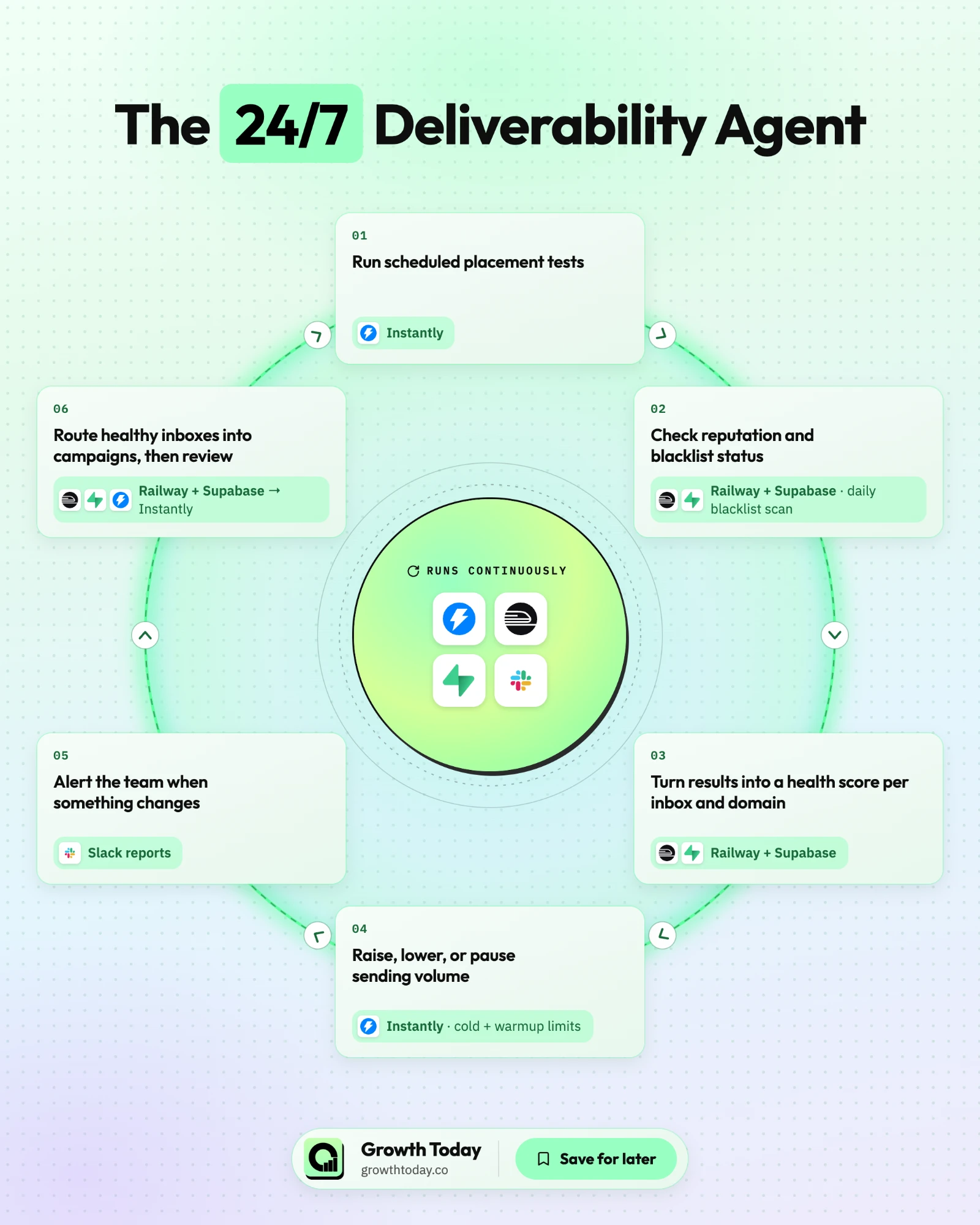
- Run scheduled placement tests.
- Check reputation and blacklist status.
- Turn the results into a health score per inbox and domain.
- Raise, lower, or pause sending volume based on that score.
- Alert the team when something changes.
- Route healthy inboxes into campaigns, then review.
The tools will change. The loop is what lasts.
Growth Today runs a version of this loop for the outbound programs it operates. Jani Vrancsik's breakdown of Growth Today's AI-native GTM engine describes the first version, built on n8n and Airtable. The current version keeps n8n for the scheduled jobs and replaces Airtable with a custom app on Railway, with Supabase as the database. Instantly runs scheduled inbox placement tests, and every sending domain is checked against major blacklists daily. The app turns the results into a health status per inbox, then pushes cold email and warmup limits and campaign routing back into Instantly, so new sends go out from the healthiest inboxes and domains.
A dashboard shows inbox health in one place, and Slack sends automated reports and alerts so problems reach the GTM engineering team. The deliverability system connects to the prospecting system, so sending status and targeting decisions inform each other. Tool choices differ by client stack, so read this as an example of the loop, not a fixed configuration.
If you are choosing tools for each stage of the loop, the Email Deliverability category in Growth Today's Sales Tools directory lists options for placement testing, warmup, and sending infrastructure.
The Cavalry outbound case study shows this kind of operation inside a live program. Growth Today ran 8 campaigns in parallel, with deliverability orchestrated across multiple inboxes and domains, and sent 106,816 emails to 25,201 unique target contacts. The program reached a 4.21% reply rate and booked 111 enterprise demos in 120 days. The ongoing work included monitoring deliverability and adjusting send volume per address based on inbox performance signals. These results came from the full Cavalry engagement, which covered data, persona-led messaging, and campaign rotation too. Deliverability was one layer of that system, not the single cause of the outcome.
When does deliverability become a GTM Engineering problem?
Deliverability becomes a GTM Engineering problem when the motion spans several domains, inboxes, providers, and campaigns, and sending status needs to drive volume, pauses, alerts, and routing automatically. At that point the work is operating a connected system, not fixing a DNS record.
A team with one domain and a few inboxes can usually handle authentication and basic monitoring internally. The picture changes when several of these conditions apply:
- multiple sending domains and inboxes;
- more than one sequencer or sending provider;
- inbox health that needs continuous testing;
- CRM and routing rules that depend on sending status;
- automatic pauses or volume changes;
- several campaigns sharing reputation that needs common governance;
- no internal owner with the time to run the system.
At that stage, inbox monitoring, volume controls, routing, data, and outbound infrastructure form one connected operating problem. Growth Today's Managed GTM Engineering service is the relevant next step: it covers ongoing GTM system design and operation across data, scoring, CRM routing, and activation. Growth Today designs, builds, and operates the workflows inside your own stack, and your team keeps ownership of the accounts, data, and workflows.
Ready to run deliverability as part of your GTM system?
Growth Today designs, builds, and operates the monitoring, volume controls, data, and routing workflows behind scaled outbound, inside your existing stack.
FAQ
What is the difference between email delivery and email deliverability?
Delivery means the receiving server accepted the message. Deliverability describes whether your mail reliably reaches the inbox over time. A campaign can show near-complete delivery while many accepted messages go to spam.
What is a good spam complaint rate for Gmail and Yahoo?
Both providers ask senders to stay below 0.3%. Google recommends keeping the rate below 0.1% and avoiding 0.3% or higher. Gmail reports the rate in Postmaster Tools, and Yahoo's Complaint Feedback Loop sends copies of complaints for DKIM-signed mail.
Why do my emails go to spam when SPF, DKIM, and DMARC pass?
Authentication confirms identity, not trust. Weak domain or IP reputation, rising complaints, invalid recipients, sudden volume increases, or a poor shared sending pool can each cause it.
How do I test email deliverability?
Combine a seed-list placement test with Google Postmaster Tools, DMARC reports, blacklist checks, and live bounce and reply data. Act on patterns that several signals confirm.
Are cold email and newsletter deliverability the same problem?
They share many authentication and reputation mechanics, but requirements can vary by sender volume and message type. Gmail and Yahoo, for example, apply one-click unsubscribe rules to marketing and subscribed messages from bulk senders. The bigger difference is the audience. Newsletter recipients opted in, while cold outbound recipients did not, so complaint risk is higher and list quality carries more weight. Cold programs tend to spread volume across many domains and inboxes, which turns monitoring into a multi-asset job.
Ready to accelerate your pipeline?
Reach out to discuss how we can help your GTM team scale with automation and expertise.