

Claude Skills for Go-To-Market Teams: The Complete Build Guide


What Claude Skills are
Claude Skills are the difference between an AI that each person on your team uses differently and one that runs your best practices the same way every time. A skill is a set of instructions, packaged as a simple folder, that teaches Claude how to handle a specific task, so you write the process once, and Claude follows it on every session, for every user. This guide covers what Claude Skills are, how to build one, how to test it, and how to fix it when it misfires, with real examples from the skills we run for sales, marketing, and revops.
Read it top to bottom the first time. Come back to the checklist at the end every time you build one.
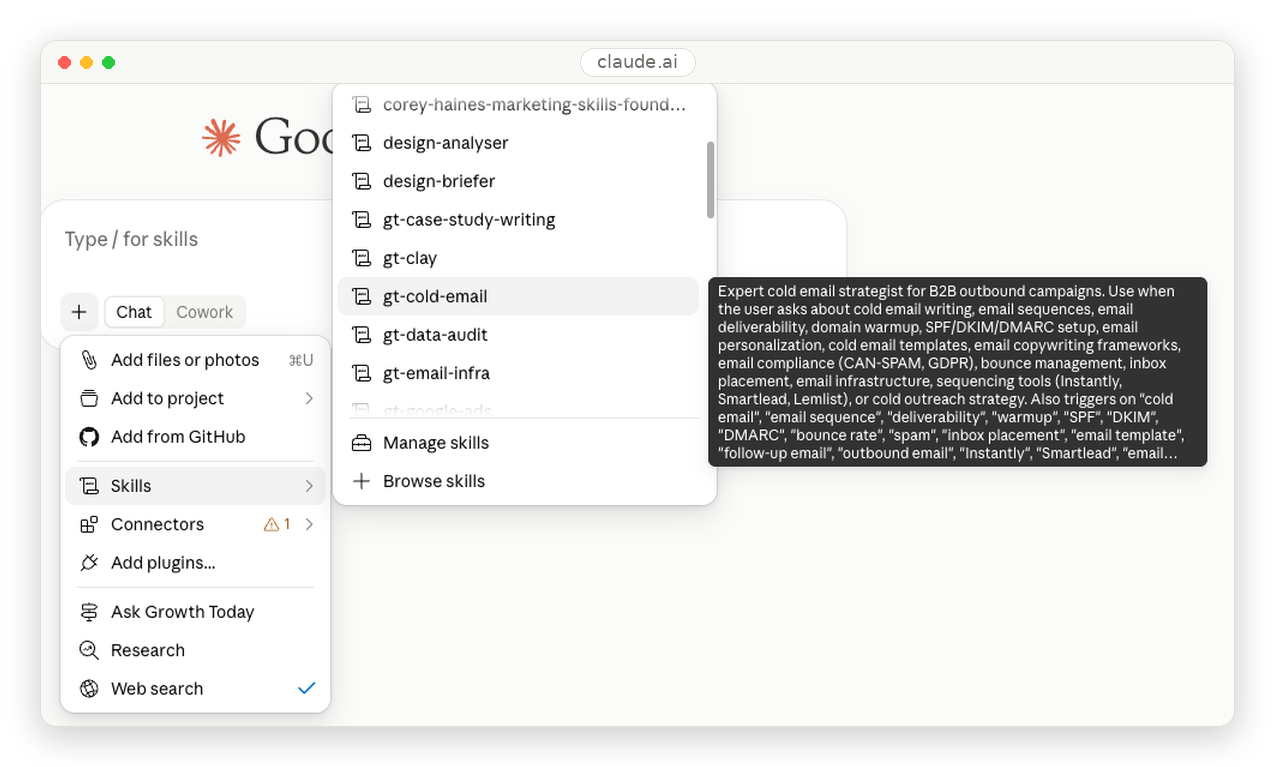
What is a Claude Skill?
A Claude Skill is a folder containing a set of instructions that teaches Claude how to handle a specific task or workflow. Instead of re-explaining your process, your standards, and your domain knowledge in every conversation, you capture it once in a skill, and Claude applies it consistently across Claude.ai, Claude Code, and the API.
Think about onboarding a new hire. You do not explain your cold email framework, your ICP scoring, and your reporting format in every conversation. You write it down once, and they reference it when the work calls for it. A skill does exactly that for Claude. Teach once, benefit every time.
One clarification that trips people up: a skill is not a prompt. A prompt tells Claude what to do once, then disappears when the chat ends. A skill is domain expertise that persists, and Claude reaches for it automatically whenever a matching task appears. You do not invoke a skill by name. It invokes itself.
Why Claude Skills matter for sales, marketing, and revops
Skills are not an engineering feature. They are an operations feature, and they hit three parts of your go-to-market motion directly.
Sales. Your outbound only works when the messaging holds a standard. A skill carries your cold email framework, objection handling, sequencing rules, and qualification criteria, so every rep who asks Claude gets the same quality floor instead of a coin flip. The framework you spent months refining stops living in one person's head.
Marketing. Your content only compounds when it sounds like you. A skill holds your brand voice, banned words, formatting rules, and positioning, so Claude writes to that standard across every author and every channel. That consistency is the first thing that breaks when more than one person is writing.
RevOps. Your systems only scale when the process is repeatable. A skill encodes your CRM hygiene rules, data audit steps, lifecycle logic, and reporting format, so the methodology runs the same way every time, and your numbers stay clean.
In an AI-native company, skills are not only for the operators. Leaders need to understand them too, because skills are how your best practices get enforced at scale without you standing over every shoulder. If you do not shape them, someone else on the team will, and the standard becomes whatever they happen to write.
What is inside a Claude Skill: the folder structure
A skill is a folder. Only the first file is required.
your-skill-name/
├── SKILL.md # Required. The main file: frontmatter + instructions.
├── scripts/ # Optional. Executable code (Python, Bash) for exact, repeatable steps.
├── references/ # Optional. Docs Claude loads only when it needs the detail.
└── assets/ # Optional. Templates, fonts, icons used in the output.
The required piece is SKILL.md, a plain text file with two parts: a short frontmatter block at the top (which tells Claude what the skill does and when to use it) and the instructions below it. The scripts folder holds code for steps that must run identically every time. The references folder holds deeper documentation. The assets folder holds templates or brand files.
Here is one of our real skills, the one Growth Today uses for LinkedIn content. It has grown past twenty versions and sits on data from thousands of analyzed posts:
growthtoday-linkedin-content/
├── SKILL.md # Routing logic + funnel-stage classification
└── resources/
├── voice/ # Brand voice rules, banned words
├── posts/ # Reference post sets from top GTM founders
├── templates/ # Hook and post structures
├── references/ # Supporting strategy docs
├── design/ # Visual format policy
└── performance/ # Engagement benchmarks
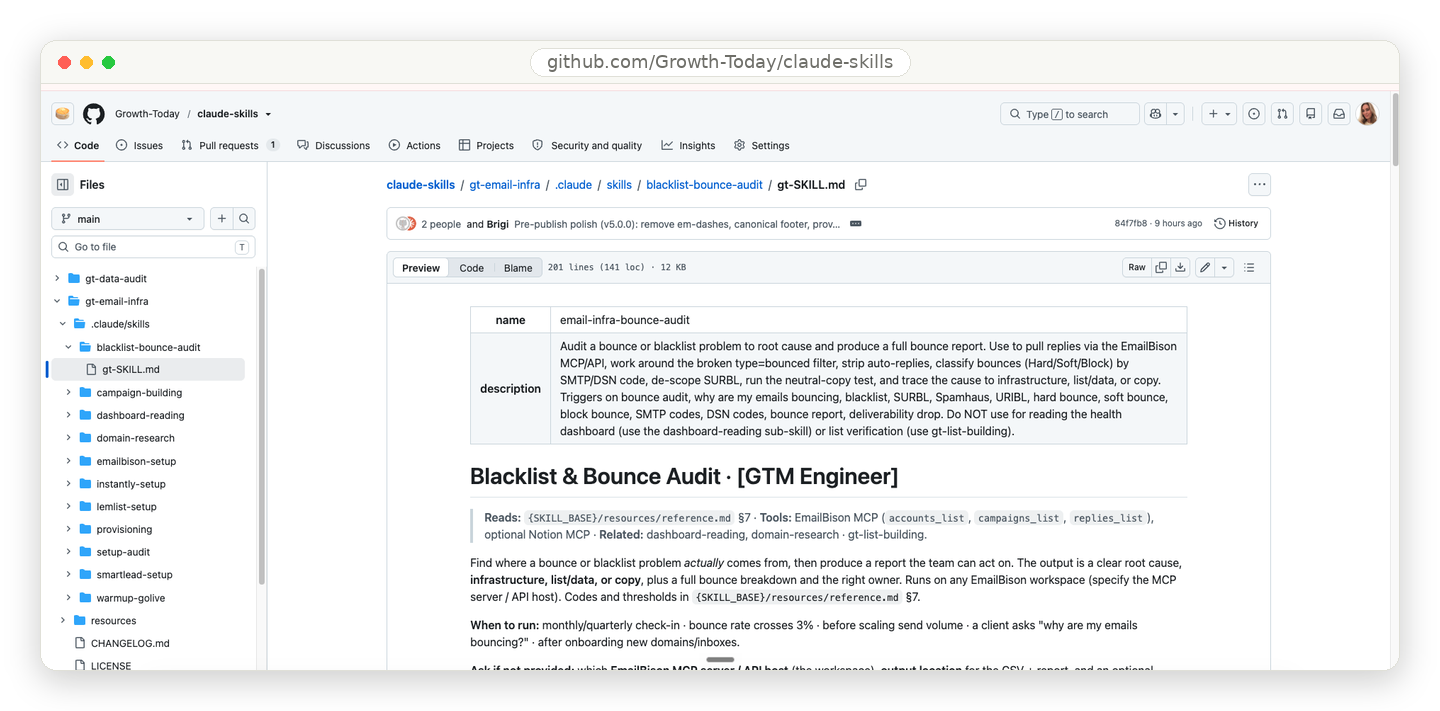
Notice the shape: the SKILL.md stays lean and routes, while the heavy material lives in resources and loads only when a request needs it. That is the core principle that makes skills work.
The principle that makes skills work: progressive disclosure
Claude does not load your entire skill every time. It uses a three-level system, and understanding it is what separates a skill that performs from one that slows Claude down.
| Level | What it is | When it loads |
|---|---|---|
| 1. Frontmatter | The name + description | Always. Sits in Claude's memory so it knows the skill exists. |
| 2. SKILL.md body | The full instructions | Only when Claude decides the skill is relevant to the task. |
| 3. Linked files | references/ and scripts/ | Only when the instructions actually reach for them. |
The practical payoff: you can hand Claude a two-hundred-page playbook without burning a single token until a task needs page 147. Keep the core SKILL.md focused. Push the detail down a level.
Two more properties matter. Skills are composable, so Claude can load several at once and your cold email skill and brand voice skill work together rather than fight. And skills are portable, so the same skill works across Claude.ai, Claude Code, and the API without modification.
Claude Skills vs MCP: What is the difference?
People mix these up constantly. The simplest way to hold it: MCP is the professional kitchen, giving Claude access to tools and ingredients. A skill is the recipe, the step-by-step instructions for making something valuable. You need both.
| MCP (connectivity) | Skills (knowledge) | |
|---|---|---|
| What it provides | Connects Claude to your service (Notion, Asana, HubSpot) | Teaches Claude how to use that service well |
| Role | Real-time data access and tool calls | Captured workflows and best practices |
| Answers | What Claude can do | How Claude should do it |
Without skills, users connect an MCP and then do not know what to do next, each conversation starts from scratch, and results are inconsistent because everyone prompts differently. With skills, the workflow activates automatically, tool usage is consistent, and best practices are baked into every interaction.
Planning your skill
Step 1 of building a skill: start with use cases
Before writing anything, identify two or three concrete use cases the skill should handle. A good use case definition names the trigger, the steps, and the result:
Use Case: Sprint Planning
Trigger: user says "help me plan this sprint" or "create sprint tasks
Steps:
1. Fetch current project status (via MCP)
2. Analyze team velocity and capacity
3. Suggest task prioritization
4. Create tasks with labels and estimates
Result: a fully planned sprint with tasks created
Ask yourself four questions: what does the user want to accomplish, what multi-step workflow does it require, which tools are needed, and what domain knowledge should be embedded.
The three types of Claude Skills
Most skills fall into one of three categories. Knowing which one you are building tells you what to focus on.
| Category | Used for | Real example | Focus on |
|---|---|---|---|
| Document & asset creation | Consistent, high-quality output (docs, decks, designs, code) | The frontend-design skill | Embedded style guides, templates, quality checklists |
| Workflow automation | Multi-step processes with a consistent method | The skill-creator skill | Step ordering, validation gates, refinement loops |
| MCP enhancement | Making raw tool access reliable | Sentry's code-review skill | Coordinating MCP calls in sequence, error handling |
For a go-to-market team, the mapping is direct. A case study writer or a LinkedIn post generator is document creation: embed the style guide and the quality checklist. A cold email sequence builder or a lead-research routine is workflow automation: lock the step order and add validation gates. A skill that drives your CRM through its connector, cleaning records or updating lifecycle stages, is MCP enhancement: sequence the calls and handle the errors. Knowing the category tells you where to spend your effort.
How do you know a skill is working? Success criteria
These are rough benchmarks, not precise thresholds, but they keep you honest.
Quantitative: the skill triggers on around 90% of relevant queries (run 10-20 test queries and track how often it loads on its own), it completes the workflow in fewer tool calls than doing it manually, and it produces zero failed calls per run.
Qualitative: users do not have to prompt Claude about next steps, workflows complete without correction, and results stay consistent across sessions. The real test: can a new team member accomplish the task on the first try with minimal guidance?
Building your skill
Naming rules that will trip you up
Two naming rules cause most failed uploads.
The file must be named exactly SKILL.md, case-sensitive. Not skill.md, not SKILL.MD. The folder must be kebab-case:
| Folder name | Valid? |
|---|---|
notion-project-setup | Yes |
Notion Project Setup | No, spaces |
notion_project_setup | No, underscores |
NotionProjectSetup | No, capitals |
The most important line in the whole skill: the description
The description inside the frontmatter is how Claude decides whether to use the skill at all. Get it right, and the skill fires at the right moment on its own. Get it wrong, and it either sits idle or hijacks conversations it has no business touching.
The minimum frontmatter:
name: your-skill-name
description: What it does. Use when the user asks to [specific phrases].
The pattern that works: [what it does] + [when to use it, with real trigger phrases] + [what it is NOT for]. The description must be under 1024 characters and contain no angle brackets.
Here is the difference in practice:
| Verdict | Description | Why |
|---|---|---|
| Bad | "Helps with projects." | Too vague. No trigger phrase, so Claude never matches it to a request. |
| Bad | "Creates sophisticated multi-page documentation systems." | Describes the output but names no trigger. Claude cannot tell when to fire it. |
| Bad | "Implements the Project entity model with hierarchical relationships." | Too technical. Describes internals, not what a user would ever type. |
| Good | "Analyzes Figma design files and generates developer handoff docs. Use when the user uploads .fig files or asks for 'design specs', 'component documentation', or 'design-to-code handoff'." | Names the trigger AND the file type. |
| Good | "Manages Linear project workflows including sprint planning, task creation, and status tracking. Use when the user mentions 'sprint', 'Linear tasks', 'project planning', or asks to 'create tickets'." | Names the domain and the exact words a user types. |
| Good | "End-to-end customer onboarding for PayFlow. Handles account creation, payment setup, and subscription management. Use when the user says 'onboard new customer', 'set up subscription', or 'create PayFlow account'." | Clear value plus concrete trigger phrases. |
And here is a real one, the actual description from Growth Today's cold email skill:
description: Expert cold email strategist for B2B outbound campaigns. Use when the user asks about cold email writing, email sequences, deliverability, domain, warmup, SPF/DKIM/DMARC setup, personalization, templates, or cold outreach strategy. Also triggers on "cold email", "email sequence", "deliverability", "warmup", "bounce rate", and "subject line". Do NOT use for marketing emails or newsletters.
It names the domain, lists the exact phrases a rep would type, and draws a hard line with "Do NOT use for" so it stays in its lane. That last line matters more than people expect: it is often what stops a skill from firing on the wrong conversations. Write the description the way your team talks, not the way an engineer documents.
Writing instructions Claude actually follows
Below the frontmatter come the instructions, and this is where most skills quietly fail. Claude loads them fine, then does not follow them, and the culprit is almost always vague language.
| Instruction | Result | |
|---|---|---|
| Bad | "Validate the data before proceeding." | Claude guesses what "validate" means. Output drifts. |
| Good | "Before you send, check that every contact has a verified email, a matching company, and a non-empty first name. If any are missing, flag the row and stop." | Nothing to guess. |
Five principles produce skills Claude follows reliably. Put the critical rules at the top, not buried on line 80. Show worked examples, not just rules, because three real examples beat twenty bullet points. Explain the why, not only the what, because Claude generalizes better from reasoning. Keep one skill to one job, because a skill doing five things triggers at the wrong time. And use code for anything that must be exact, because code is deterministic and language interpretation is not.
Here is a complete, well-formed SKILL.md to copy the shape of:
name: cold-email-writer
description: Writes first-touch cold emails using our ICP and voice rules. Use when the user asks to "write a cold email", "draft outreach", or mentions a "first touch" for a named prospect. Do NOT use for follow-ups or newsletters.
---
# Cold Email Writer
## Important - read first
Every email must be under 120 words, reference one specific detail about the
prospect's company, and end with a single soft question. No exceptions.
## Step 1: Gather inputs
Confirm you have: prospect name, role, company, and one relevant insight.
If any are missing, ask before writing.
## Step 2: Draft against the framework
Follow the structure in references/framework.md:
observation -> relevance -> soft ask. One idea per email.
## Step 3: Check before delivering
Run scripts/word_count.py on the draft. If it returns over 120, cut it down.
## Example
Input: Maria, VP Sales at Acme, posted about slow ramp times.
Output: [short email opening on the ramp-time post, one soft question]
## Do NOT
- Use "I hope this finds you well" or any filler opener.
- Pitch in the first email. The only goal is a reply.
The critical rule sits at the top, each step is concrete, the deep framework is pushed into a reference file, an exact example shows the target, and a "Do NOT" block closes the common failure modes.
Two more habits make instructions robust. First, tell Claude what to do when something breaks, rather than hoping it will not:
## If the connector fails
If a CRM call returns "connection refused":
1. Tell the user the connector is not reachable.
2. Do NOT fabricate the record. Stop and ask them to reconnect.
Second, point at your reference files explicitly so Claude knows what to load and why:
Before drafting, consult references/voice.md for:
- banned words
- sentence-length rules
- the approved opening patterns
This is progressive disclosure in action: the rule lives in a reference file, and the instruction tells Claude exactly when to reach for it.
How to build a Claude Skill, start to finish
The reliable way is not "open the builder and describe what you want." That produces mediocre skills.
Do the task with Claude first, then save it. Walk Claude through the real job step by step using real inputs: a real draft, a real spreadsheet, a real account. You are the expert teaching your method. Refine until the output is genuinely right, and only then turn that conversation into a skill. You are extracting a process that already worked instead of guessing at one. This is the single highest-leverage habit in skill building.
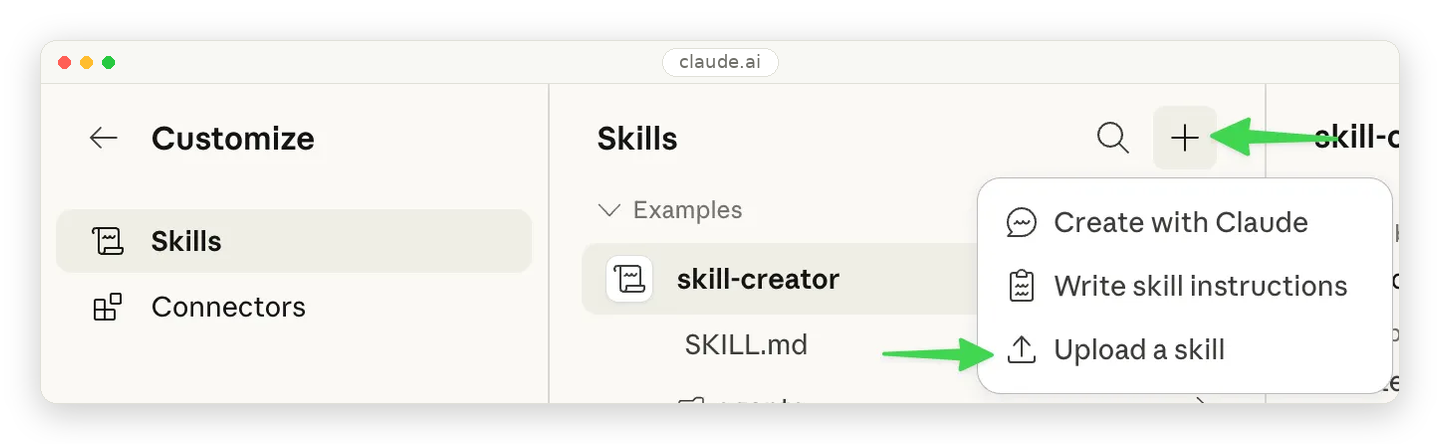
Claude ships with a tool for exactly this, the skill-creator. Turn it on once (under Customize, then Skills), then ask it to package a working process into a properly formatted skill, suggest trigger phrases, and test what it builds before saving. It is the skill you use to build every other skill.
Testing and shipping
How to test a Claude Skill
A skill that is never tested is a skill that misfires in front of a client. Testing covers three areas.
Triggering. Does it load when it should and stay quiet when it should not? Write requests that should fire it and a few that should not:
Should trigger:
"Write a cold email to the VP Sales at Acme"
"Draft first-touch outreach for this prospect"
Should NOT trigger:
"Write our monthly newsletter"
"Draft a follow-up to the email I sent Tuesday"
A fast debugging trick: ask Claude, "When would you use the cold-email-writer skill?" It quotes the description back, and you see exactly what is missing.
Function. Run a real task through it. Check the output is correct, complete, and formatted as specified. Run it three to five times and compare: a good skill produces the same shape every time. Write the test the way an engineer would, naming what you give it, what it does, and what must come out:
Test: draft a first-touch email for a named prospect
Given: prospect = "Maria, VP Sales at Acme", insight = "posted about slow ramp"
When: the skill runs
Then:
- email is under 120 words
- it references the ramp-time post
- it ends with exactly one soft question
- no filler opener ("I hope this finds you well")
Writing the "Then" list first, before you run anything, is what turns a vague "looks good" into a real pass-or-fail check.
Improvement over baseline. Run the same task with and without the skill and compare honestly:
| Without the skill | With the skill | |
|---|---|---|
| Context | Re-explained every time | Loaded automatically |
| Back-and-forth | ~15 messages | 2 clarifying questions |
| Failed attempts | 3, retried | 0 |
| Tokens | ~12,000 | ~6,000 |
| Output | Varies by person | Identical across the team |
That gap is the whole reason to build the skill. If the gap is small, the task may not need a skill, and that is useful to learn early.
Three ways to install a skill
The skill itself is identical in all three. Which path you use depends only on how you work.
Option 1. Deploy for the whole team (organization). On Team and Enterprise, an owner provisions the skill for everyone from Organization settings, then Skills. It shows up for every user with a team indicator, with central updates and an on or off toggle. One deploy, everyone current. This is how you make a framework the standard instead of a file twenty people each chase down.
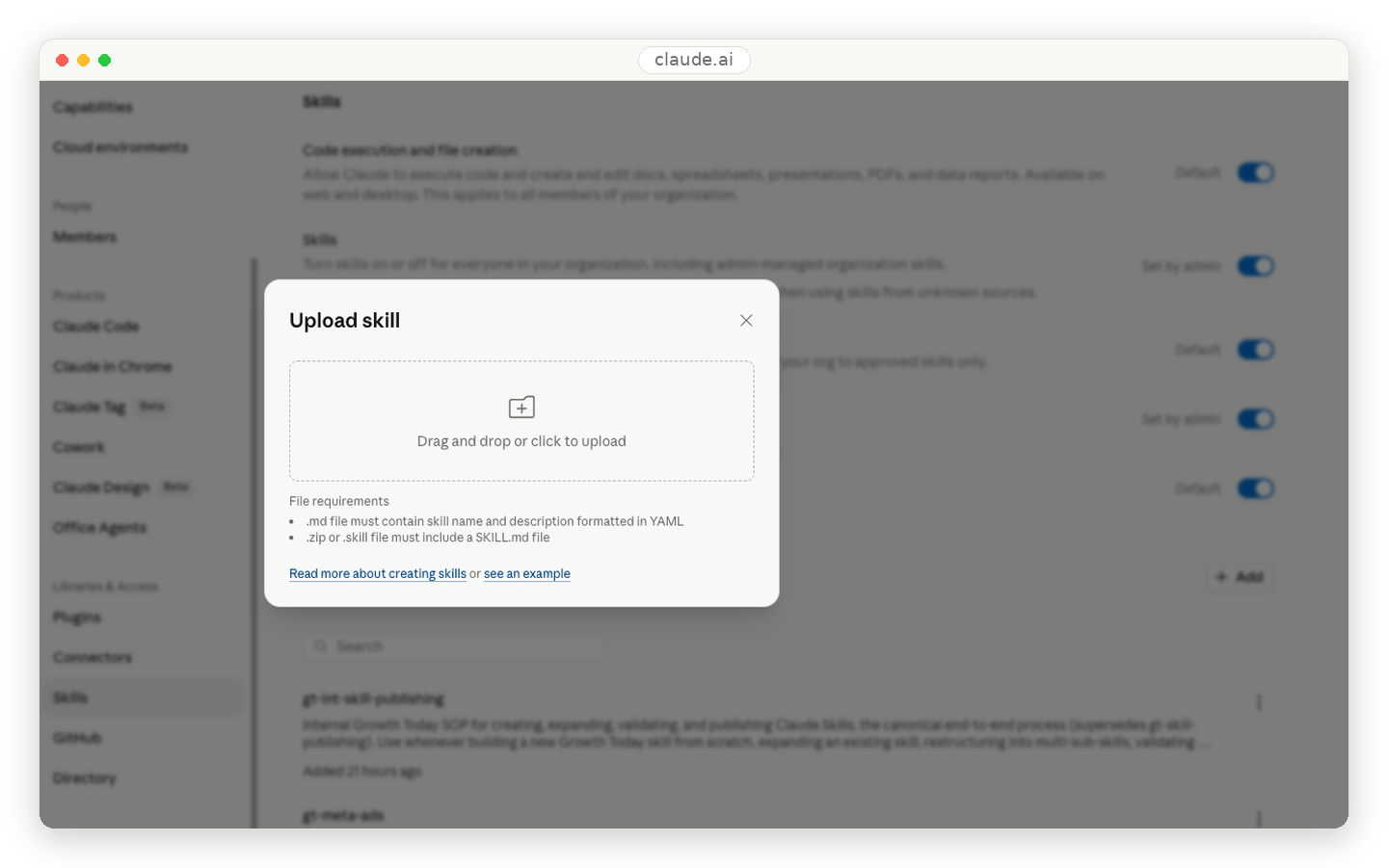
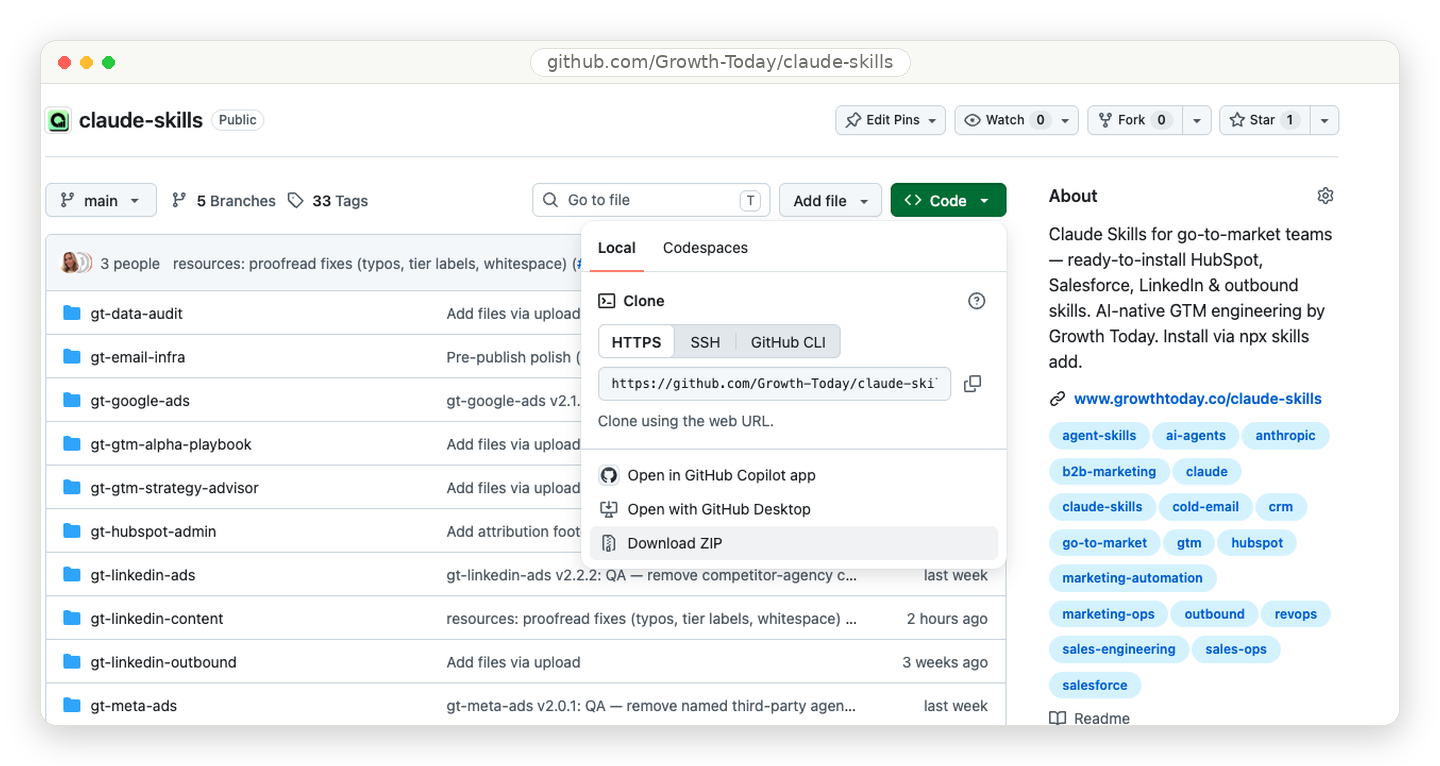
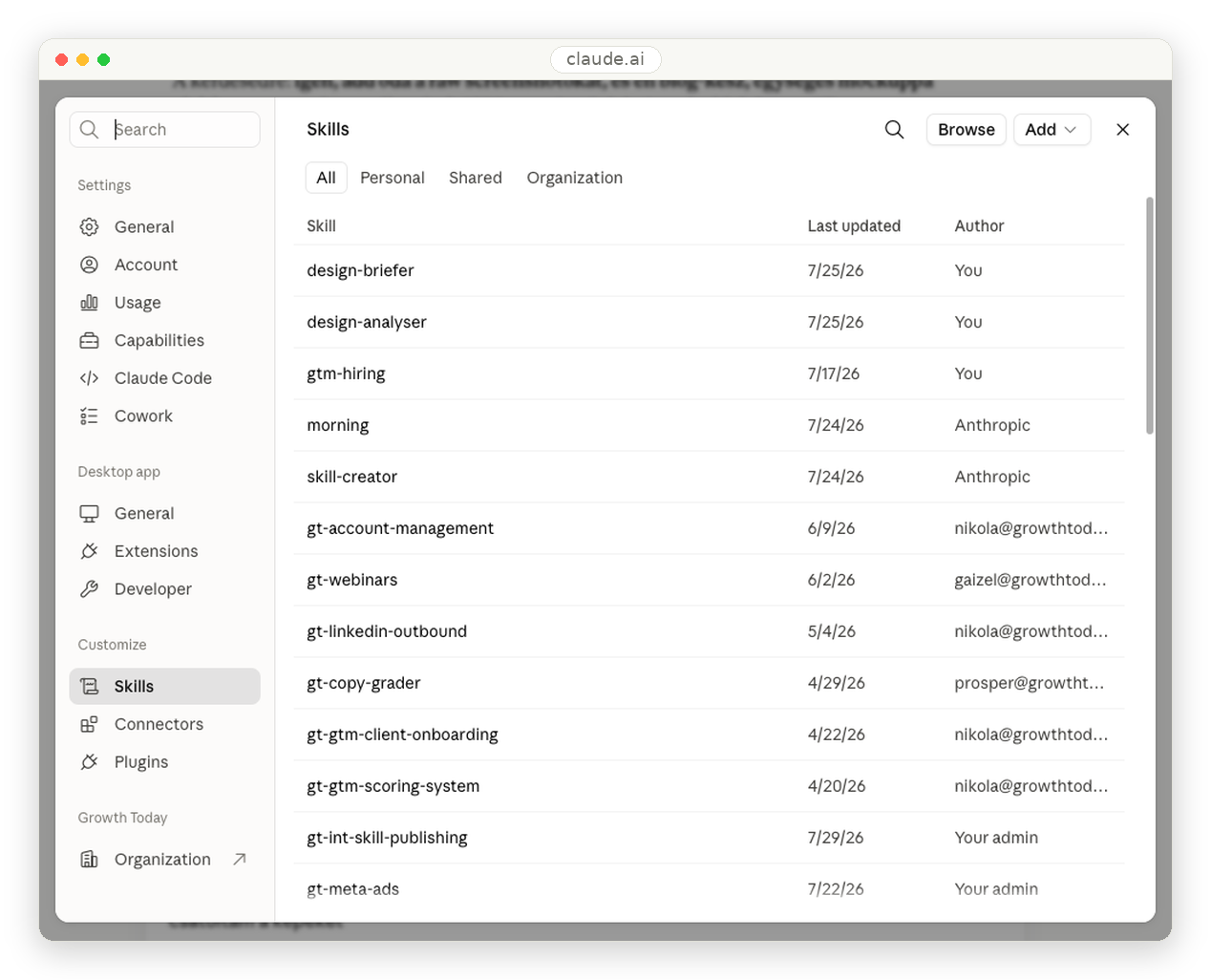
Option 2. Install on your own account (no terminal). Use this if you work in Claude.ai or the desktop app. Open the skill on the repo, click the green Code button, then Download ZIP. If the repo holds several skills, download the one folder you need and zip that folder. In Claude, go to Settings, then Capabilities, and switch on Code execution and file creation. Then open Customize, then Skills, click the plus, choose Upload a skill, and select your ZIP. The skill now works in both Chat and Cowork. In Cowork, type the slash key to see your skills and pick one.
Option 3. Pull it in via terminal (Claude Code). Use this if you live in the terminal. One command pulls the skill straight in:
npx skills add Growth-Today/claude-skills/gt-email-infra
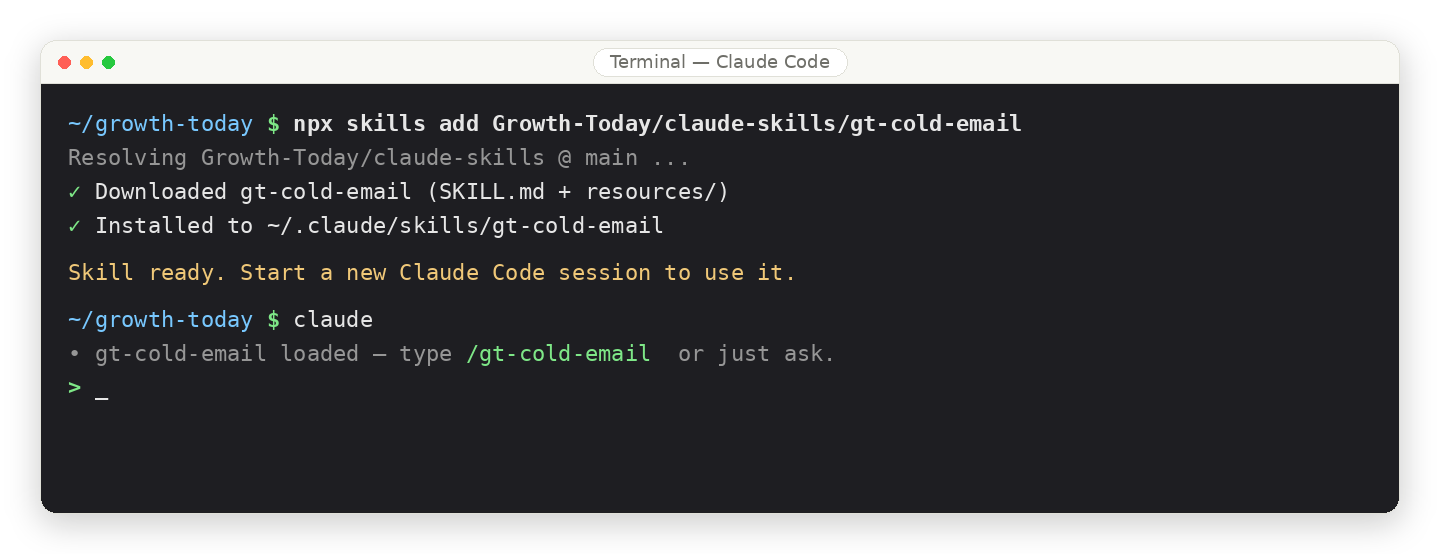
Start a new session and the skill is live. You can also drop the skill folder into the personal skills directory to make it available in every project, or into a project's skills directory to keep it to that one repo.
Treat skills as living documents. Your frameworks change, so the skill has to change with them. Keep them in a shared repository, note the version at the top of each file, and update them like any other operating document. Growth Today's LinkedIn skill is past twenty versions for exactly this reason: when the process improves, the whole team gets the new version, not a stale copy from three months ago.
For programmatic use (apps, agents, automated pipelines), skills are available through the API via the /v1/skills endpoint and the container.skills parameter. Use Claude.ai and Claude Code for hands-on work and individual workflows; use the API for production deployments at scale.
How to describe a skill so people actually use it
Whether you are writing an internal README, a landing page, or a note to your team, how you describe a skill decides whether anyone turns it on. The rule: lead with the outcome, not the mechanics.
| Description | Why | |
|---|---|---|
| Bad | "This skill is a folder with YAML frontmatter and markdown instructions that calls our CRM connector." | Describes the plumbing. Nobody wants plumbing. |
| Good | "Set up a complete, clean prospect record in seconds instead of spending twenty minutes on manual data entry." | Describes the outcome and the time saved. |
And when a skill sits on top of a connector, name both halves of the story: the connector gives Claude access to your data, and the skill teaches Claude your team's workflow for it. Access plus method is what turns a raw connection into a reliable, repeatable result.
Patterns and Troubleshooting
Common Claude Skill patterns
Five patterns cover most of what you will build. Here is each one with a go-to-market example you can adapt.
1. Sequential workflow. Use when steps must happen in a fixed order. Onboarding a new client is the classic case:
## Workflow: onboard a new client
Step 1: Create the account record (CRM connector)
Step 2: Pull firmographics and enrich (data connector)
Step 3: Build the first outreach sequence (cold email skill)
Step 4: Notify the account owner (Slack connector)
Each step waits for the previous one. If a step fails, stop and report.
2. Multi-service coordination. Use when the workflow spans several tools. A content-to-publish handoff:
## Phase 1 - Draft (LinkedIn-content skill)
Generate the post and the visual brief.
## Phase 2 - Store (Drive connector)
Save the draft and assets, return shareable links.
## Phase 3 - Schedule (scheduling connector)
Queue the post, attach the asset links.
## Phase 4 - Notify (Slack connector)
Post the summary to the content channel.
3. Iterative refinement. Use when output improves with passes. A case study draft:
## Draft
Generate the first version from the client notes.
## Quality check
Run against the checklist: structure, banned words, one clear result metric.
## Refine
Fix each flagged issue, regenerate only the weak sections, re-check.
Repeat until the checklist passes. Then finalize.
4. Context-aware selection. Use when the same goal needs different handling by context. Routing a lead by fit:
## Decision
- Enterprise account (over 1000 employees): route to the ABM sequence
- Mid-market: route to the standard outbound sequence
- Existing customer: route to the expansion play
Then run the matching sub-workflow and tell the user which path it took.
5. Domain-specific intelligence. Use when the skill adds judgment beyond tool access. A compliance gate before outreach:
## Before sending
1. Check the contact against the suppression list.
2. Confirm the region allows cold outreach (GDPR, CAN-SPAM).
3. If either fails: flag the contact, do NOT send, log the reason.
## Only if both pass
Proceed with the sequence.
Troubleshooting: when Claude Skills go wrong
Five failure modes cover almost everything.
| Symptom | Cause | Fix |
|---|---|---|
"Could not find SKILL.md" on upload | Filename is wrong | Rename to exactly SKILL.md, case-sensitive |
| "Invalid frontmatter" on upload | Missing --- delimiter or unclosed quote | Fix the delimiters and quotes |
| Skill never triggers | Weak description | Add the exact phrases your team says; run the "when would you use this" test |
| Skill triggers too often | Description too broad | Narrow scope, add a "Do NOT use for" line |
| Claude ignores the instructions | Too long, buried, or vague | Trim, move critical rules to the top, replace vague lines with a checklist or a script |
| Slow or degraded answers | Too much loaded at once | Keep SKILL.md under ~5,000 words, enable skills selectively |
The "invalid frontmatter" error is worth seeing up close, because it is almost always one of these three:
# Wrong - missing the --- delimiters
name: my-skill
description: Does things
# Wrong - unclosed quote
---
name: my-skill
description: "Does things
---
# Correct
---
name: my-skill
description: Does things. Use when the user asks to do things.
---
The Claude Skill pre-flight checklist
Run through this every time you build one.
Before you start
- Identified 2-3 concrete use cases
- Listed the tools it needs
- Planned the folder structure
During build
- Folder in kebab-case
- File named exactly SKILL.md
- Frontmatter wrapped in
---delimiters - name is kebab-case and matches the folder
- description says what and when, with real trigger phrases
- description has a "Do NOT use for" line
- No angle brackets in the frontmatter
- Critical rules at the top of the instructions
- At least one worked example
- Deep detail pushed into references/
Before upload
- Tested triggering on obvious requests
- Tested triggering on paraphrased requests
- Confirmed it does NOT fire on unrelated topics
- Ran a real task through it
- Zipped the folder
After upload
- Tested in a real conversation
- Watched for under- or over-triggering
- Noted the version at the top of SKILL.md
Claude Skill frontmatter reference
Everything you can put in the frontmatter, in one place:
# Required
name: skill-name-in-kebab-case
description: What it does and when to use it, with real trigger phrases.
# Optional
license: MIT
metadata:
  author: Your Company
  version: 1.0.0
  category: sales
  tags: [outbound, email]
Two hard rules, both for security, since the frontmatter sits in Claude's system prompt: no angle brackets anywhere, and no skill may be named with "claude" or "anthropic" (reserved).
Frequently asked questions
What is a Claude Skill?
A folder of instructions, built around a required SKILL.md file, that teaches Claude how to handle a specific task so it runs the same way every time without re-prompting.
Do I need to know how to code to build one?
No. A basic skill is a single markdown file with a description and step-by-step instructions in plain language. Code is optional, used only for steps that must be exact.
What is the difference between a skill and a prompt?
A prompt is a one-time instruction that disappears when the chat ends. A skill persists and triggers automatically whenever a matching task appears.
How is a skill different from MCP?
MCP connects Claude to a service. A skill teaches Claude how to use it well. MCP is what Claude can do; a skill is how it should do it.
How do I share a skill with my team?
Upload individually under Settings, or, for a whole workspace, have an admin deploy it centrally with automatic updates.
Where this leaves you
Claude Skills turn Claude from a smart tool that each person uses differently into a system that runs your best practices the same way every time. For a go-to-market team, that is the difference between AI as a novelty and AI as infrastructure, and the barrier is low: a working skill is a markdown file you can build in an afternoon and improve for years.
You do not have to build everything from scratch. Growth Today packages the skills we use to run sales, marketing, and revops into a set you can pull straight into your own Claude setup, with the framework for managing them well.
Ready to accelerate your pipeline?
Reach out to discuss how we can help your GTM team scale with automation and expertise.